Google showed one page on our own website 64,750 times in thirteen weeks. Fifty people clicked it.
That is not a typo, and it is not the story of a broken page. It is what search visibility looks like from the inside for a site like ours, and it is worth ten minutes of your time, because the same gap is probably sitting in your own Search Console right now.
An impression is not an invitation
An impression means Google put a link to your page in front of someone. It does not mean they read the address, noticed the listing, or cared. It is the cheapest thing Google can hand out, and it is the number most reports show first, because it is large and it grows.
Clicks are the honest number. From 17 August to 15 November 2026, our whole site received 193,511 impressions in Google and 1,062 clicks. That is a click rate of 0.55% at an average position of about 30.
One page carries a third of the visibility
A single page collects a third of all of it. Our website statistics page appeared in Google 64,750 times in those thirteen weeks and received 50 clicks. Its click rate is 0.08% and its average position is 48.2.
Put that page next to the rest of the site and the shape of the problem stops being abstract.
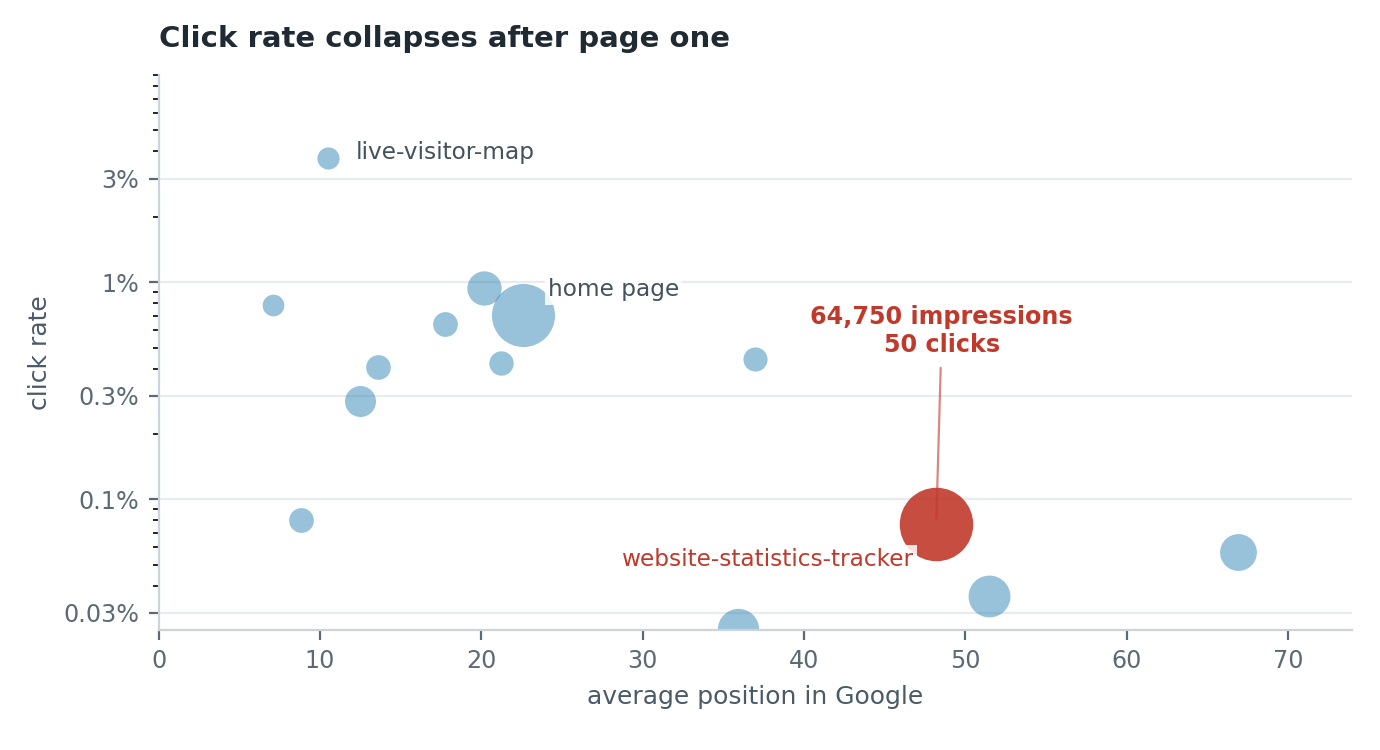
The pages closest to the top turn impressions into visits several times more often than the pages further down. It is a strong pattern rather than a law, and the chart has honest exceptions: one comparison page at position 8.8 earned a single click from 1,242 impressions, which is its own lesson about a listing that convinces nobody.
Everything on that page is right, except where Google puts it
Here is the uncomfortable part. There is nothing obviously broken to blame.
The title reads “Website Statistics Tracker: Check Your Website Stats”. The H1 reads “Website statistics tracker for live website stats”. The page runs about 2,100 words, answers the obvious questions in an FAQ block, links to six related blog and guide pages, and exists in 28 languages.
By any checklist you will find online, it is optimized. Google still puts it at position 48.
The lesson worth keeping: a page can match the words perfectly and stay invisible. Position is Google’s judgement about which page answers the question best, and that judgement weighs far more than the words you repeated. Matching the search gives your page the right to be in the list. It does not give it the top of the list.
Where the clicks dry up
Four pages on the same site, one number that changes everything:
| Page | Impressions | Clicks | Average position | Click rate |
|---|---|---|---|---|
| Live visitor map | 828 | 31 | 10.5 | 3.74% |
| Real time visitor tracking | 4,052 | 38 | 20.2 | 0.94% |
| Home page | 37,180 | 263 | 22.6 | 0.71% |
| Website statistics tracker | 64,750 | 50 | 48.2 | 0.08% |
That gives a usable rule of thumb, and it comes from our own numbers rather than a benchmark chart. If a page sits under about position 20, the words on the page and the words in the search box are worth working on. If it sits past 30, the words are not the problem, and a fresh title tag will not save it. That page needs to be a stronger answer to the query than the pages above it, or it needs to stop being the page you point at that query.
What people actually typed
Reading the query list is the step most site owners skip, and it is the most revealing one.
The statistics page ranks for plain, spoken words. “website stats” brought 4,411 impressions at position 39.9. “website statistics” brought 2,785 at 39.2. “web stats” brought 767 at 33.4. Then the questions arrive: “how many site visits” with 507 impressions at position 55.3, “check number of visits to website” with 466 at 60.3, “find site statistics” with 457 at 68.5.
Nobody typed “web analytics platform”. They typed the thing they wanted to see.
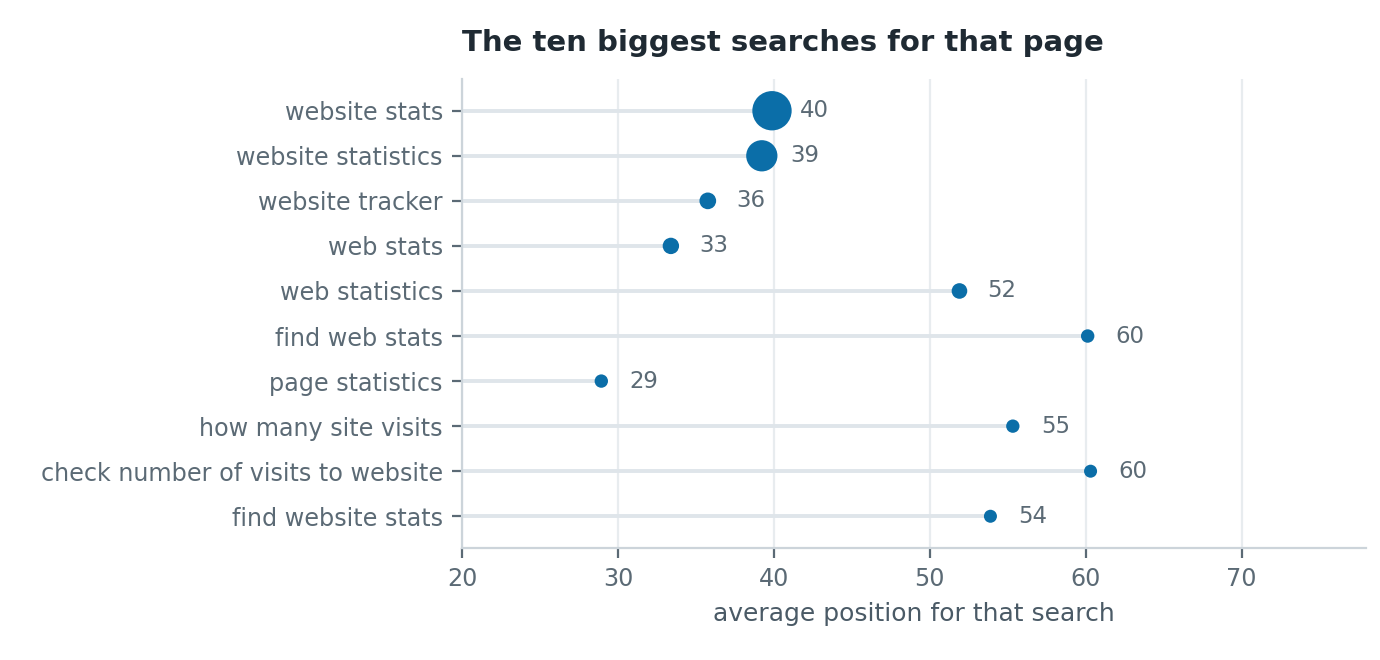
The same question arrives in other languages. “aantal hits website” in Dutch, 189 impressions at position 74.9. “besucherstatistik website” in German, 75 impressions at position 72.1. “licznik odwiedzin strony” in Polish, position 82.7. Same intent, different words, all of them well below the line where anyone clicks.
Two things follow from that. Plain words carry the volume, so write about the thing a person wants to see, in the words they use for it, instead of the words your industry uses for it. And the long tail is not free traffic. It is a hundred small rankings on page five, and together they make an impressive number in a monthly report that brings almost no visits.
The three moves that make sense from here
The first move is to stop treating impressions as reach. A page at position 48 is being tried out by Google, not recommended by it.
The second is to put the plain questions where the site already has strength. If a help page or a guide chapter ranks better than a landing page, the question belongs on the help page, answered in the first screen, with the landing page linking to it. One good answer beats two mediocre ones.
The third is patience about the words and urgency about the position. A page that already matches the query does not need another round of keyword editing. It needs a reason for Google to rank it higher, which in practice means better content on the topic or links from people who care about it.
None of that is a quick fix, and we would rather say so than sell you a title tag.
Your ten minute version
- Open Search Console, go to Performance, set the date range to the last three months and open the Pages tab.
- Sort by impressions. Find the pages with big impressions and a click rate under 1%.
- For each one, open the Queries tab and read the average position of its biggest queries.
- Under position 20: the words are worth fixing. Use the query as a person types it in the title, in the H1 and in the first paragraph, and answer it immediately.
- Past position 30: the words are fine. Decide whether the query matters, and if it does, whether a different page should carry it.
- Repeat once a month. Positions move slowly, and a weekly read of a small site is mostly noise.
How we measured this
The data comes from our own Google Search Console property for hitsteps.com, for 17 August to 15 November 2026, thirteen complete weeks. Property totals come from the date dimension: 193,511 impressions and 1,062 clicks. Page figures come from the page dimension, which returned our 200 largest pages, together 167,834 impressions. The query figures for the statistics page come from its 300 largest query rows. Positions are Google’s average for the whole period, and percentages are rounded.
The limits are worth stating. This is one site, in one category, with modest traffic, so treat the positions as an illustration rather than a benchmark. Click rates vary with the query, the device and how the listing looks on the day. And this is all Search Console, which reports what Google chose to show, not what visitors did when they arrived.
What you can fix today
Google decides whether your page is worth showing. What happens after the click is yours: which pages hold people, where a form loses them, and which source brings visits that turn into trials.
Hitsteps records that on your own site from the first pageview. The traffic source report shows which channels bring visits that stay, and real time visitor tracking shows what people do in the minutes after they land. You can also open the live demo and watch a real website’s visitors move without signing up.
When you are ready for your own numbers, create a free account and paste one line of code into your site. Your first pageview is recorded the moment someone arrives.
