Free plan
1 website, up to 2,000 pageviews a month, 14 days of history, secure (HTTPS) tracking. No credit card, no expiry.
Track one website for free with Hitsteps: live visitors, pageviews, where they came from and which pages they read. The Free plan covers up to 2,000 pageviews a month and never expires.
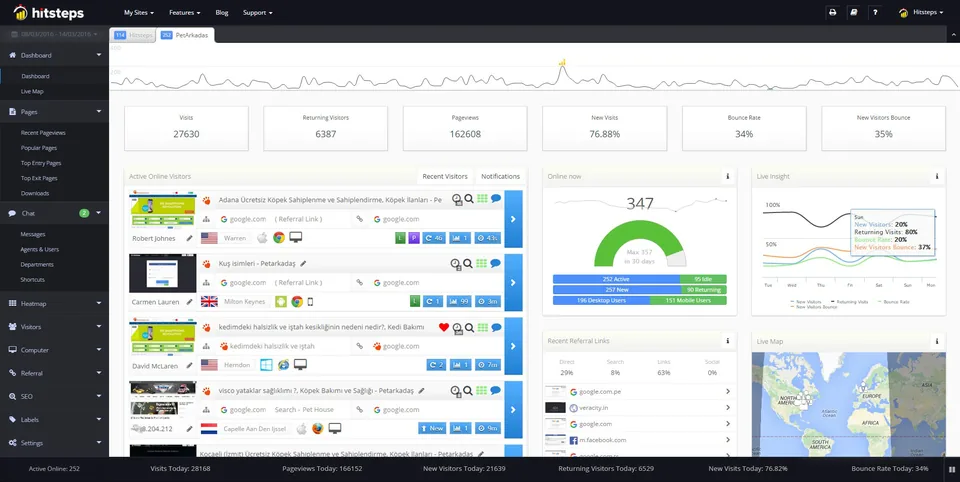
1 website, up to 2,000 pageviews a month, 14 days of history, secure (HTTPS) tracking. No credit card, no expiry.
New accounts can try goals, live chat, heatmaps and more for 7 days, no card. You then stay on Free unless you choose a plan.
A personal site, a new blog, a portfolio or a small business site under 2,000 pageviews a month.
More traffic, more sites, longer history, goals or heatmaps. Paid plans start at $4.99 a month; see the pricing page.
1. Create a free account. 2. Copy the tracking code, or install the WordPress plugin or the Shopify app. 3. Open the live view and watch your first visit arrive. Stuck? Read the setup guide.
Coming from Google Analytics? See Hitsteps and Google Analytics compared.
Using the free Cloudflare Web Analytics? See Hitsteps and Cloudflare Web Analytics compared. Weighing a paid privacy-first tool? See the Pirsch comparison. Coming from a product analytics suite? See the PostHog comparison.
Yes. The Free plan covers one website and up to 2,000 pageviews a month, with 14 days of history and no credit card. It does not expire.
Goals, live chat, click heatmaps and uptime monitoring are paid features, and the Free plan keeps 14 days of history. New accounts get a 7-day Pro trial with no card so you can try those before deciding.
Then the Free plan is too small for that site. Paid plans start at $4.99 a month for 10,000 pageviews and 2 sites. You choose when to upgrade; there is no automatic charge because no card is on file.
Create an account, copy the tracking code, and paste it into your site. WordPress has a plugin, Shopify has an app, and Google Tag Manager, Wix and a plain script tag also work. Your first visits usually appear within minutes.
For many small sites, yes: it shows visitors, sources, pages and trends without the Google Analytics setup. If you rely on Google Ads or Search Console integrations built into Google Analytics, keep it alongside. See the comparison page for details.
Add the code, open the live view, and see your first visitor in minutes.