Hitsteps vs Smartlook

A Smartlook alternative that pairs click heatmaps with live analytics

Smartlook is a product analytics tool built around session recordings, heatmaps, funnels and event tracking for websites and mobile apps. Hitsteps is a web analytics tool with click heatmaps, real-time visitors, traffic sources, UTM campaigns and goals in one workspace.

If you mostly want to see where visitors click and which campaign brought them, Hitsteps answers it without a second tool.

  • Click heatmaps for your pages
  • Real-time visitors · traffic sources · UTM campaigns
  • Goals · goal revenue · segments · live chat
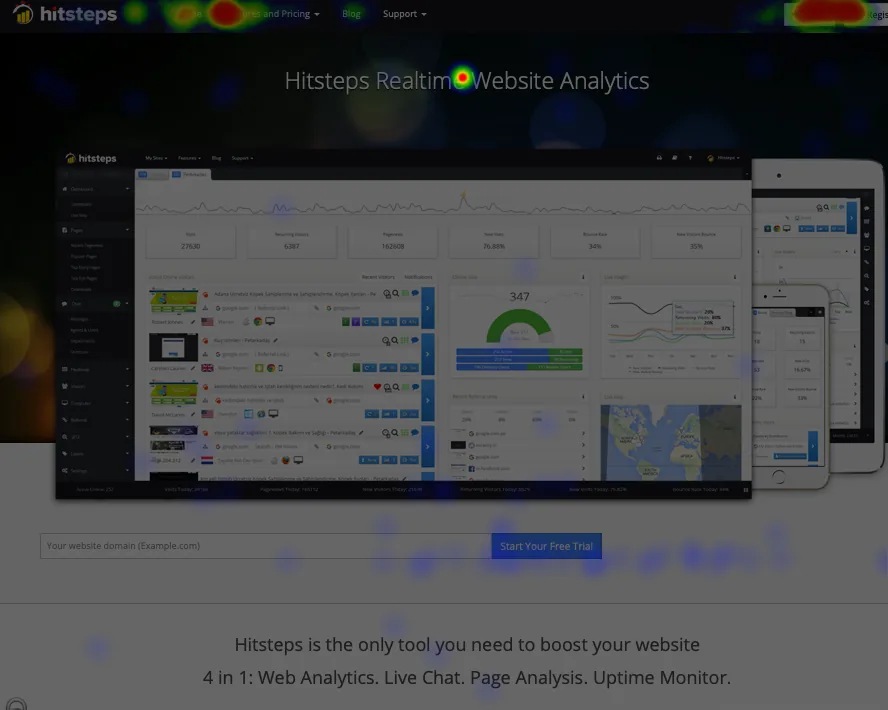
Click heatmap on a web page
Which one fits

Choose by the question you need answered

Choose Hitsteps if

You want click heatmaps and your traffic, campaign and goal numbers together, with real-time visitors and no extra tool to manage.

Website heatmap tool Try the live demo — no signup

Session recording is off until you turn it on for a website and captures a daily sample of visits. Availability depends on your plan and account, as shown in your dashboard. Session recording.

What Smartlook offers

Smartlook offers session recordings, mobile app tracking and event-based product analytics. Hitsteps offers session recordings as well, but not mobile app tracking or event-based product analytics.

Campaign attribution

See which UTM campaign or ad source brought the visitors you are studying.

UTM attribution

Frequently asked questions

Is Hitsteps a Smartlook alternative?

If you mainly want to see where visitors click and how people reach your pages, yes: Hitsteps combines click heatmaps with real-time visitor analytics, traffic sources and goals. Smartlook is a behaviour-research product; Hitsteps does not offer everything it does.

What does Hitsteps do that Smartlook does not?

It is a full web analytics tool, so traffic sources, UTM campaigns, goals, goal revenue, live visitors and segments sit next to the heatmaps.

What does Smartlook do that Hitsteps does not?

Smartlook focuses on recordings, events and mobile app behaviour. Hitsteps records sessions too, but does not offer mobile app tracking or event-based product analytics.

How is pricing different?

Smartlook sells no new paid subscriptions since 31 May 2026 and no renewals or expansions since 31 August 2026 (pricing page, checked 30 Oct 2026). Check www.smartlook.com for current prices. Hitsteps plans are on the pricing page; compare the limits for your traffic before choosing.

Can I try Hitsteps heatmaps before switching?

Yes. Sign up, add the tracking code, and run the click heatmap next to your current tool. You do not need to remove Smartlook first.

Smartlook

Smartlook details are summarised from its public website and may change. See Smartlook pricing and www.smartlook.com for current plans. Smartlook is a trademark of its owner; this page is not affiliated with or endorsed by Smartlook. Checked 30 Oct 2026.

Related comparisons

Comparing more than two tools? Read the FullStory comparison, the Hotjar comparison and how to read a heatmap.

Try click heatmaps on your own site

Add the tracking code, open a heatmap for a key page and see which elements get the clicks.

Start watching real visitors free

Hitsteps vs Smartlook: key differences

NeedHitstepsSmartlook
Live visitors as they browseYes: open an active visit and follow its page path as it happens.Smartlook focuses on session recordings and heatmaps.
Click heatmapsYes, from the Growth plan.Yes: Smartlook includes click heatmaps; no new paid subscriptions are sold since 31 May 2026 (pricing page, checked 30 Oct 2026).
Live chat with visitorsYes, from the Starter plan.Not listed as a Smartlook feature.
Free planYes: 1 site, up to 2,000 pageviews/month, 14 days of history.Smartlook lists a free plan with limits while the product winds down; free access runs until 30 September 2027 (pricing page, checked 30 Oct 2026).