Heatmaps and visitor tracking for HighLevel funnels and websites
HighLevel gives your clients the pages. Hitsteps gives you the visits behind them: who is on the page right now, where they came from, what they clicked, and how far through a funnel they got. One pasted script does it, and HighLevel already has a field for it.
- Live visitors, traffic sources and page paths
- Click heatmaps, funnels and goals in one dashboard
- Works in HighLevel's Head tracking code, no app required
Start with a 7-day Pro trial. No credit card required. The Free plan is there when the trial ends.
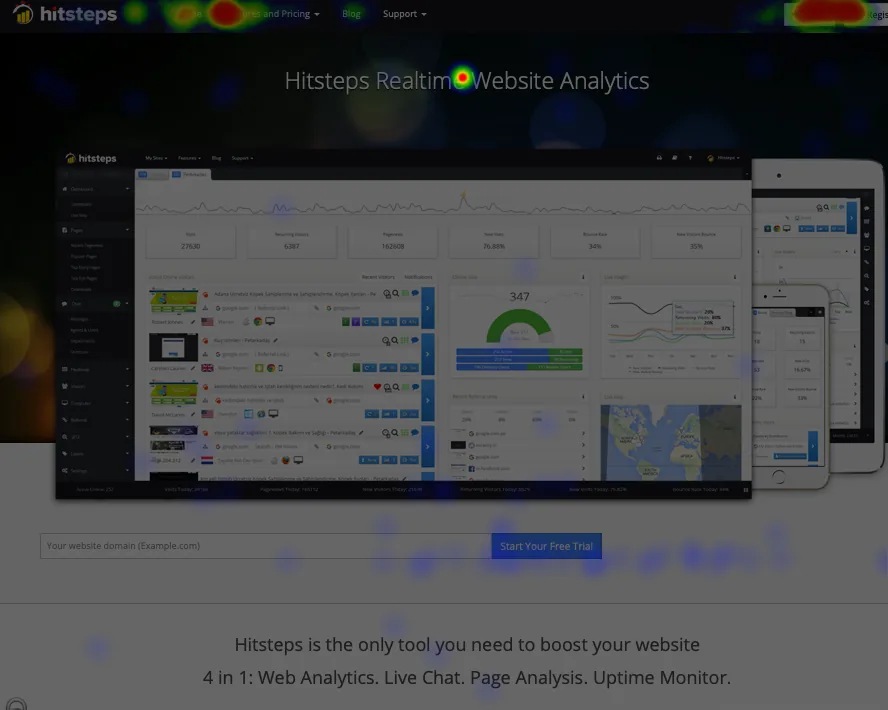
What you get once the snippet is in
Everything below comes from the one script. Nothing has to be wired up page by page.
Live visitors, right now
Open the dashboard after a funnel goes live and watch visits arrive with their source, path, device and location while the visit is still happening.
Funnels and goals
Build a funnel out of the stages your client cares about, watch where people drop, and count the goals that matter. Funnels are on Pro and above; goals start on Starter.
Click heatmaps
See which buttons, links and images on a funnel step get pressed and which are ignored, read beside the visitor feed in the same workspace. Heatmaps are on Growth and above.
How to add Hitsteps to HighLevel
These steps follow HighLevel's own help article, "Add Tracking Code/Script to Funnels and Websites", last modified 9 October 2026 and read on 6 November 2026. Labels can move as HighLevel updates its editor; the fields are the same.
Create an account and add your website
Create your Hitsteps account and add the public URL of the client site as a website. Open its Tracking code tab and copy the whole snippet, including the script and the noscript parts. Use the snippet for that website, not an API key.
Site-wide: paste it in the funnel or website Settings
In HighLevel, go to Sites, then Funnels or Websites, and open the one you want to track. Open the Settings tab, find Head tracking code, paste the snippet and click Save. This covers every step or page of that funnel or website, so you only do it once.
Or page-level: paste it in the builder
If the script should run on one page only, open that page in the builder, click Tracking Code, paste into Header Tracking and save. Use this for a single funnel step, not for your main analytics.
Open the published page and confirm a visit
Open the live, published page in a normal browser window and click around. Go back to Hitsteps and look for the visit under Recent visitors. Check the published site on its real domain, not the HighLevel editor or a preview.
Want the general version first? How to track website visitors covers the same first-visit check for any platform.
Three HighLevel details worth knowing
These come from HighLevel's own help and troubleshooting articles, read on 6 November 2026. They explain most "it is not working" reports.
The code is injected in the browser, so View Source will not show it. HighLevel adds head and body tracking codes on the client side, which means they are missing from the static page source. That is normal. Verify with your browser's developer tools or with the provider's own checker, and by confirming a live visit in Recent visitors.
Cloned pages do not carry page-level code. When you duplicate a page or a funnel step, the page-level tracking code stays behind. Site-wide code keeps working because it belongs to the funnel or website. Re-add the page-level code on any copy you make.
Do not paste the same script in both places. If it is already in Head tracking code for the funnel or website, leave the page-level field alone. HighLevel's own FAQ says a duplicate install is why the same event fires twice.
HighLevel also ships its own Cookie Consent Banner for funnels and websites. Whether you need it for your audience is your decision; this page makes no privacy or legal claim either way.
Built for an agency running client funnels
One account holds many sites, so the setup repeats per client but the dashboard does not.
One login, every client site
Keep each client as its own website in the same account and switch between them without a new install or a new bill per site.
Proof the funnel works
Show a client the step where people leave, the source that brings them, and the heatmap of the page they leave from. Numbers they can act on, not a monthly total.
Check it from anywhere
The dashboard runs in the browser and there are iPhone and Android apps, so a live visit can be checked away from the desk.
Free plan: 1 website, 2,000 pageviews a month, 14 days of history. Paid plans from $4.99 a month. Goals from Starter, click heatmaps from Growth, funnels from Pro. The Pro plan tracks 30 websites and the Business plan tracks 100. A 7-day Pro trial starts without a credit card.
HighLevel analytics questions
Do I need a HighLevel plugin or a marketplace app?
No. HighLevel's funnel and website settings already accept a pasted tracking script, so you add the snippet yourself and nothing has to be installed from a marketplace. This page is a setup guide, not a HighLevel add-on: there is no Hitsteps app inside HighLevel and no connection to authorise.
Why can't I find the code in View Source?
HighLevel injects head and body tracking codes in the browser, so they often do not appear in the static page source. That is expected, not a failed install. Confirm it by opening the published page in a normal browser window, then looking for the visit under Recent visitors in your Hitsteps dashboard. Browser developer tools show the same thing if you prefer to check the request itself.
Should I use site-wide tracking or page-level tracking?
Site-wide covers every step of one funnel or one website, so paste the snippet once in Settings > Head tracking code. Use page-level Header Tracking only when a script should run on a single page. Most analytics belongs site-wide.
What happens when I clone or duplicate a page?
Page-level tracking code is not copied when a page or funnel step is duplicated. Site-wide code keeps working because it sits on the funnel or website, not on the page. After you copy a page, open it in the builder and add the page-level code again if you rely on it.
Why do my events fire twice?
The same script is usually installed twice: once at the site level and once at page level. Keep it in one place. For a whole funnel or website that is the site-wide Head tracking code field.
Is this an official HighLevel integration?
No. This is an independent setup guide for pasting a tracking script into HighLevel's own tracking code fields. HighLevel is a trademark of its owner; this page is not affiliated with or endorsed by HighLevel.
How much does it cost to track a HighLevel site?
The Free plan covers 1 website with up to 2,000 pageviews a month and 14 days of history. Paid plans start at $4.99 a month. Click heatmaps are on the Growth plan and above, funnels are on Pro and above, and goals start on Starter. The Pro plan tracks 30 websites and the Business plan tracks 100, which suits an agency running client funnels. A 7-day Pro trial starts without a credit card.
Take a closer look
HighLevel is a trademark of its owner. This page is an independent setup guide and is not affiliated with or endorsed by HighLevel.
See your next HighLevel funnel visit
Create your account, copy the snippet, paste it into Head tracking code on the funnel or website, then open the published page and look for the visit.
7-day Pro trial. No card needed. Click heatmaps are on the Growth plan and above.