What is a website heatmap?
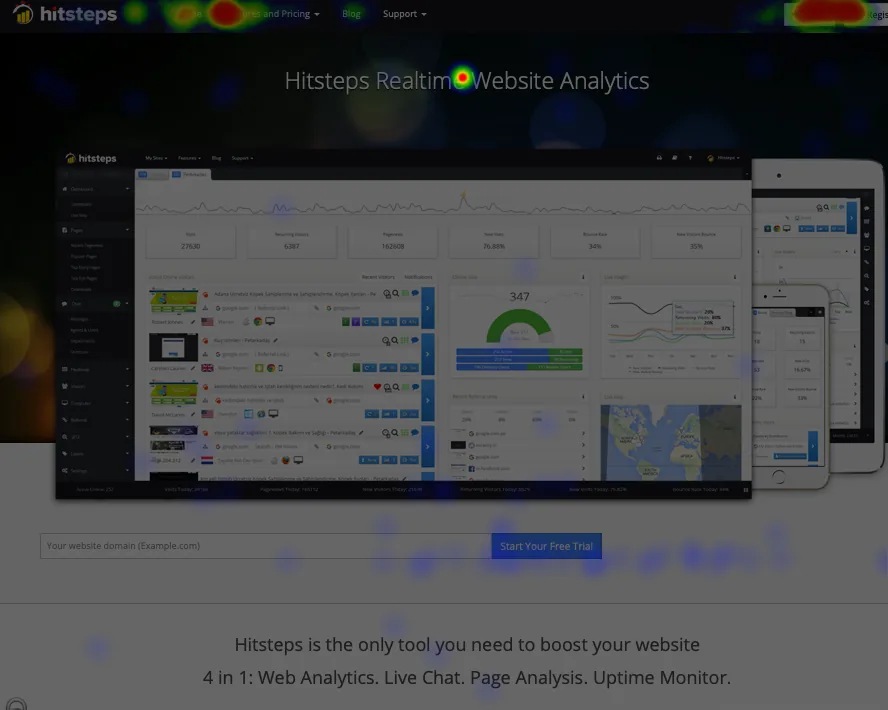
A website heatmap colors a page by where people click. A click map names the element, such as a button, a link or an image. Both show whether the page is doing its job.
- Warmer areas mark more activity. Cooler areas mark less.
- A click map shows the button, link or image. A heatmap shows where those clicks pile up.
- Free and Starter do not include heatmaps. Click heatmaps start on Growth.
The short answer
A website heatmap shows where visitors click on a page, so you can see what gets attention and what gets ignored. Warmer areas mark more activity. Cooler areas mark less. A click map is the same evidence, named by element: the button, the link or the image.
On Hitsteps the two sit together:
- A click heatmap colors the parts of a tracked page that receive more or fewer clicks.
- A click map shows exactly which elements people click, such as buttons, links and images.
- Page analysis sits next to that picture, in the same workspace as traffic sources and visits.
The product page for this is Website heatmap tool.
Heatmap and click map, side by side
| Heatmap | Click map | |
|---|---|---|
| What you see | Color on the areas that get more or fewer clicks | The button, link or image that was clicked |
| The question it answers | Where is the activity concentrated? | What did people click? |
| What it is not | Not a playback of one visit | Not a list of events you have to define first |
If you only remember one rule: open a heatmap when you want the busy and quiet parts of a page. Open a click map when you want the name of the element.
When to use which
Use a click map to check one page. Look at the main button, the menu link or the offer, and see whether people click things that are not links.
Use heatmap colors when you want to compare areas. The busy sections stand out. The ignored sections stay cool, so you can move or rewrite the weak ones.
There is no single minimum for every site. A small sample can expose obvious click patterns. A bigger decision needs enough representative traffic that you are not reacting to a few unusual visits.
A heatmap is not session replay. Replay plays one visit back. The heatmap stacks many visits on the page. What is session replay?
Open a heatmap
- Create a site in Hitsteps and install the tracking code once, or use one supported plugin or app. Do not combine a plugin, a manual snippet and Google Tag Manager for the same site. The setup steps are in How to track website visitors.
- Open your site and confirm the visit in the dashboard.
- Open the heatmap and page analysis for that page.
The picture belongs with the rest of the visit: traffic sources, the pages people opened, and the goals you already track.
Which plans include the website heatmap tool?
Free and Starter do not include heatmaps. Growth includes up to 3 active heatmaps, 2,000 sampled pageviews each, kept for 7 days, without session recordings. Pro and higher plans include Experience heatmaps and recordings. Recording stays off until you turn it on for the site.
Frequently asked questions
What is a website heatmap?
A website heatmap shows where visitors click on a page, so you can see what gets attention and what gets ignored. Warmer areas mark more activity. Cooler areas mark less.
What is a click map?
A click map shows exactly which elements on a page people click, such as buttons, links and images. A heatmap colors the page by how often areas get attention, so busy zones stand out at a glance.
How is a heatmap different from a click map?
A click map names the element. A heatmap colors the area. Click maps answer what people click. Heatmaps show where the activity is concentrated. On Hitsteps both sit with page analysis.
How much traffic does a heatmap need?
There is no single minimum for every site. A small sample can expose obvious click patterns. Higher stakes design decisions should use enough representative traffic to avoid reacting to a few unusual visits.
How do I open a heatmap?
Create a site, install the tracking code once, and confirm a visit in the dashboard. Then open the heatmap and page analysis for that page. The tool page is Website heatmap tool.
Is a heatmap the same as session replay?
No. A heatmap stacks many visits on one page. Session replay plays one visit back. Recording stays off until you turn it on for that website. Read What is session replay?
Which plans include the website heatmap tool?
Free and Starter do not include heatmaps. Growth includes up to 3 active heatmaps, 2,000 sampled pageviews each, kept for 7 days, without session recordings. Pro and higher plans include Experience heatmaps and recordings. Recording stays off until you turn it on for the site.
See where people click on your own page.
Create a free account, install the tracking code and open your first heatmap.