The best website heatmap software in 2026
Heatmap tools differ on three things: what the map records, how much traffic it needs before it tells the truth, and which plan unlocks it. This list compares eight tools people shortlist in 2026, with what each one actually shows on your own pages.
- Click maps drawn from real visits on your pages
- Maps read next to traffic sources, sessions and goals
- Free plan, paid plans from $4.99 a month
What is the best website heatmap software?
The best tool is the one you will still open next month. For most small sites that means a map you can read without a training course, drawn from traffic you already have, sitting beside the reports you check anyway.
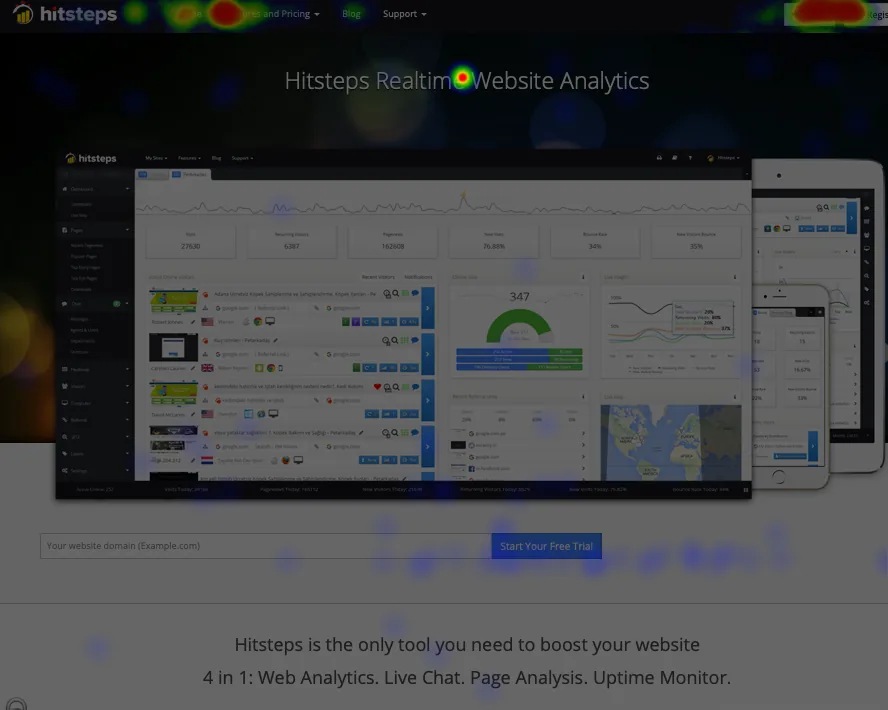
If your question is "which part of this page do people actually press?", you want a click map plus the context around it. Hitsteps draws the click heatmap from real visits and keeps it in the same workspace as the visitor feed, the traffic sources and the paths, so a warm area can be read next to the page's traffic without switching tools. The free plan covers 1 site with 2,000 pageviews a month, paid plans start at $4.99 a month, and click heatmaps are included from the Growth plan upward.
- One tracking code. Script tag, WordPress plugin or Shopify app, and the map starts filling in on the next visits.
- Maps beside the visitor feed. The heatmap, the feed and the sources sit in one workspace, so a warm area is read next to the page's traffic instead of guessed at.
- Reports you already use. Sources, pages and goals come from the same data, so the numbers agree.
Four things that separate heatmap tools
What the map records
Clicks, movement, scrolling and attention are different signals. Decide which one answers your question before comparing feature lists, because a map of the wrong signal still looks convincing.
How much traffic it needs
A map built from twenty visits is a guess. Check how the tool handles small samples, and whether it splits desktop and mobile, so a quiet week does not read as a design problem.
Which plan includes it
Heatmaps often sit behind a paid tier or a pageview cap. Look at the plan you will be on in three months, not the free trial you start on.
How it installs
One script tag, a plugin or an app store listing. If the install needs a developer and an afternoon, the map will stay half-finished while the old tool keeps running.
Eight website heatmap tools compared
One line on what each tool's maps are built from. Every name links to our own page for that tool, where the vendor facts and their check dates are listed.
| Tool | What its maps are built from | Read more |
|---|---|---|
| Hitsteps | Click heatmaps drawn from real visits, read beside the visitor feed, traffic sources and goals. Free plan, paid from $4.99 a month, click heatmaps from Growth. | Heatmap tool |
| Microsoft Clarity | Free session recording with heatmap features documented in Microsoft's Clarity heatmap guide. | Hitsteps vs Microsoft Clarity |
| Crazy Egg | Click heatmaps for your pages. | Hitsteps vs Crazy Egg |
| Hotjar | A behaviour-research suite with click heatmaps, surveys, feedback widgets and user interviews. | Hitsteps vs Hotjar |
| Mouseflow | A behaviour-analytics tool with session replay, heatmaps and funnels. | Hitsteps vs Mouseflow |
| Lucky Orange | Session recordings, heatmaps, surveys and chat on one script. | Hitsteps vs Lucky Orange |
| Inspectlet | A behaviour-analytics tool with session recordings, heatmaps, form analytics and A/B test insight. | Hitsteps vs Inspectlet |
| Smartlook | Session recordings, heatmaps, funnels and event tracking for websites and mobile apps. | Hitsteps vs Smartlook |
Session replay and product-analytics tools such as FullStory sit in the same shortlists. The full set of per-tool pages is on the comparison hub.
What Hitsteps adds to this list
A heatmap tells you where the clicks landed. In Hitsteps it sits beside the visitor feed, which lists every visit with its page path, source and journey, and each visit row carries a heatmap icon that opens the map for the page that visit reached. The same data backs the funnel and the UTM report.
Read the map, then ask the AI assistant which source brought this week's signups, or let uptime monitoring message you when the page you just changed stops answering.
Decide with these five questions
- Which change will you make from this map? Write the sentence first. The tool should answer that sentence, not produce a prettier picture.
- Do you need the clicks or the traffic around them? A map alone shows where. Beside the visitor feed and the sources it shows the page's traffic, which is what you compare a change against.
- How many pageviews in three months? Check the plan that size lands on, because heatmap access and caps usually change with it.
- Does it split mobile from desktop? A combined map can hide that half your visitors never see the button you moved.
- Can you install it today? A plugin or a single script beats a project plan you will postpone.
Install it, wait for a few hundred visits on the page you care about, and read the map twice a week apart before you redesign anything.
Website heatmap software: common questions
What is website heatmap software?
It colors a page by where visitors clicked, so you can see which buttons, links and images get attention and which are ignored. The map is drawn from real visits on your own pages, next to the rest of your traffic reports.
How many visits does a heatmap need before it means something?
A map from a handful of visits shows noise. A few hundred visits on the same page start to repeat: the same buttons stay hot and the same corners stay cold. Read a thin map as a hint and confirm it after a week of traffic.
How much does website heatmap software cost?
Heatmaps are usually a paid feature or a limited free tier. Hitsteps has a free plan of 1 site with 2,000 pageviews a month, paid plans from $4.99 a month, and click heatmaps from the Growth plan upward. A 7-day Pro trial starts without a credit card.
Do I need a separate heatmap tool if I already have analytics?
Analytics tells you that a page got 500 visits. A heatmap shows what those visitors did on the page itself: which call to action they pressed and which one they never reached. If you act on page layout, the map answers a question the visit counts cannot.
Read your own pages with Hitsteps
Install the tracking code, open the heatmap on your busiest page, and see where the clicks actually land.
7-day Pro trial. No card needed. Click heatmaps are on the Growth plan and above.
Sources and further reading
- Shortlist informed by 2026 roundups checked 6 November 2026, including Mouseflow's best heatmap tools comparison and Amplitude's best heatmap software list. Each tool's own page carries its vendor facts and check date.
- Microsoft's Clarity heatmap features documentation is the source for its map types.
- Plan facts from our pricing page: free plan, 1 site, 2,000 pageviews a month; paid plans from $4.99 a month; click heatmaps from Growth; 7-day Pro trial without a credit card.
- New to maps? Read how to read a heatmap before you buy anything.