Configured availability checks
Check selected websites or endpoints on the schedule supported by the account. Available intervals depend on plan and monitor configuration.
Website uptime monitoring watches configured sites and endpoints on a schedule and turns a failed check into a clear signal for your team. Hitsteps keeps availability checks and incident history near the analytics workspace you use for live visitors and traffic.
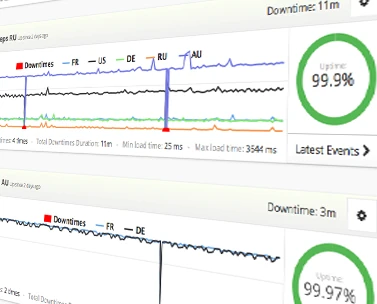
Uptime monitoring sends scheduled requests to a configured website or endpoint and records whether it responds as expected. It can alert a team to observed downtime, but no remote monitor can guarantee that every visitor experienced the same result.
Website availability monitoring works best when target, interval, contacts, and response path are deliberate. Checks use multiple scanner locations, but a remote check cannot guarantee every visitor saw the same result.
Check selected websites or endpoints on the schedule supported by the account. Available intervals depend on plan and monitor configuration.
Route supported notifications through configured channels. Email may be available alongside SMS or voice. SMS and voice use uptime credits; email and SMS contacts need dashboard verification.
Review recorded monitor state and incident timing so the team can document what happened and refine escalation.
Some eligible configurations can use supported Cloudflare DNS failover or SSH actions. They are optional, plan-dependent, and inactive until dashboard verification. They cannot guarantee recovery.
Use it when you need live visitor context, practical installation routes, and action tools around the traffic you already have.
Hitsteps has kept evolving across website platforms, browser changes, analytics shifts, and store workflows.
WordPress, Shopify, Wix, Google Tag Manager, HTML, CMS, commerce, browser, and desktop setup paths are documented from one hub.
Live dashboard, visitor profiles, heatmaps, chat, Segments, uptime, reports, and alerts stay connected after tracking is installed.



Use uptime results as an external observation, then verify the application, network, DNS, and dependent services before deciding what failed or whether recovery is complete.
Add the public website or endpoint whose availability matters and define the expected check behavior.
Select the available interval and notification contacts, taking plan limits and channel credits into account. Verify contacts in the dashboard.
Confirm that the right people can receive and recognize a test notification before an actual incident occurs.
Use monitor history to investigate failures, document the response, and adjust escalation or recovery settings carefully.
Monitor storefronts, checkout entry points, or lead pages where prolonged unavailability can interrupt customer activity. Pair alerts with live visitor tracking to see traffic around an incident.
Watch a public application or status endpoint and give the technical team an earlier signal to investigate.
Keep availability checks for several managed websites near the analytics workflows used for those sites. Site and monitor limits depend on plan.
Uptime monitoring is available on Pro plans and above. Free, Starter, and Growth do not include uptime monitors in the public plan table. Monitor counts, credits, and pricing are listed in features and pricing. Compare plans.
Clear answers about what this feature reports, how to use it, and where its limits are.
The available check interval depends on the uptime feature, selected plan, and monitor configuration. Review the current setting shown when you create or edit the monitor.
Email may be available alongside SMS or voice options. Channel availability, destination support, and usage credits depend on the account plan and configuration. Contacts need dashboard verification.
Yes. Uptime checks use multiple scanner locations (two or more). A remote check still cannot guarantee every visitor saw the same result.
Some eligible configurations can use supported Cloudflare DNS failover or SSH actions. These actions are optional, plan-dependent, require secure setup and dashboard verification, and cannot guarantee recovery.
Pro and above. Compare current monitor and credit limits on features.php#price.
Uptime sits in the same Hitsteps account as real-time visitor tracking and related reports. Heatmaps are a separate feature available on Growth and above.
Connect this report with the surrounding visitor, acquisition, and workflow context.
Add website downtime alerts next to the analytics you already use.