Enforce Anti-bot & Anti-spam analytics filtering

Today we have a real deal for you, for those of you who are tired of getting excited by a high peak on your traffic only to know that it’s been a Microsoft Bingbot, Google bot, Facebook crawler or any other bot crawling around in your website.

We had a basic bot filtering in place since our launch last year, but now we have tighten this system.

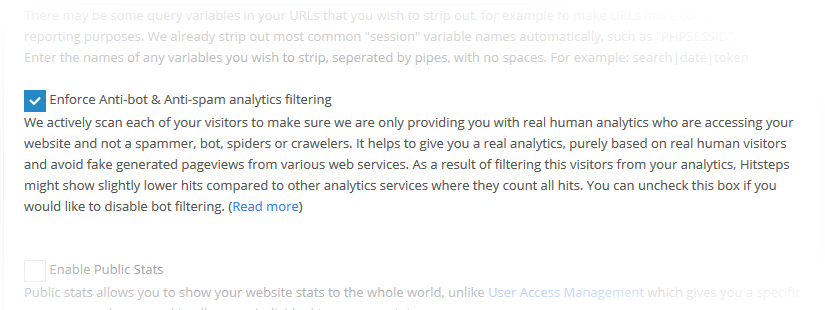
Now we actively scan each one of your visitors to make sure we are only providing you with real human analytics who are accessing your website.

It helps to give you a real analytics insight, purely based on real human visitors and avoid fake generated pageviews from various web services.

For example, if somebody share your page on facebook, facebook will open your website to take a snapshot for thumbnail photos. this process will repeat for each new shares. Normally you might think you are getting lot of visitors, but in fact they are all Facebook thumbnail generator bots trying to open your website and get list of photos to show them upon sharing. It give you false hope and screw your analytics data. We have eliminated it!

As a result of filtering this visitors from your analytics, Hitsteps might show slightly lower hits compared to other analytics services where they count all hits. It come to our attention that many many analytics still track visitors like in ancient days and ignoring the fact that nowadays, many web services have a tool to scan your website and thus, they show you not so useful analytics insight.

If you were still unsure about hitsteps analytics, but now you made up your mind, go ahead! We will meet you inside. Get Hitsteps WordPress plugin.


Percentage values in Email report and Dashboard pages

We have decided to change the way we shown percentage values in hitsteps.

You most probably seen that first item ( e.g. in popular pages section ) is always 100%. Reason behind it was that we calculate percentage value relative to highest hit. We did this back in our private beta times when our customers wanted more contrast between each value.

After some internal discussion and our customers feedbacks, we have decided to change percentage values to be relative to total hits, as a result, represent a better picture of each row.

This change has been applied to your email report and dashboard as of today.

Continue reading Percentage values in Email report and Dashboard pages

Referral Spammers, no more!

If you looked at your analytics data recently and looked at your referral section, probably you have noticed some strange referrals from websites that you cannot identify why they should send you visitors!

email-gateway-anti-spam

We are strictly against spam and automated bots in hitsteps and we are against this method of referral spamming too. as you know, your analytics number and list of online users only reflect your true human visitors and you won’t see bots, spammers and spiders in your web statistics.

These services are not actually sending you real traffic! we have analyzed all traffics coming from them for all of our customers and we noticed a bounce rate of 100%, it means all visitors come through them close website as soon as it is loaded. this is highly unlikely scenario from human-line browsing.

so why they do this? They are actually advertising to you. this way, they can show their name to you in your statistics report. so you get curious and follow up to see who are they and visit their website! so this way they increase their visibility not only in hitsteps, all other analytics such as google analytics, piwik and … too, as they show them as your top referral once they have send enough (useless and bounced!) traffic to you.

We don’t know how they send this traffic to you, but we assure you this traffics are spam and therefore their name in your referral section is spam as well, as a result we have took necessary action to protect our users from spam statistics and continue to provide real human web analytics.

Starting from today, this referrals won’t show up as your online visitor, won’t count as a pageview and won’t show up in your referrals in hitsteps.

If you are only using hitsteps, then you are protected!

Jetpack Contact Form Analytics

We have received many positive responses from you when we first launched WooCommerce order analytics, Ninja form, Gravity forms and Contact form 7 email analytics last month, and today we are excited to announce Integration with Automattic Jetpack for WordPress.

Grab Hitsteps latest WordPress plugin and it will automatically integrate visitor IP address, Visitor name (if they registered or leave comment), Device info, Visit path and much more in your incoming emails.

If you not willing to receive analytics informations, but want to use hitsteps, you can turn this feature off in WordPress Setting of Hitsteps.

WooCommerce Integration

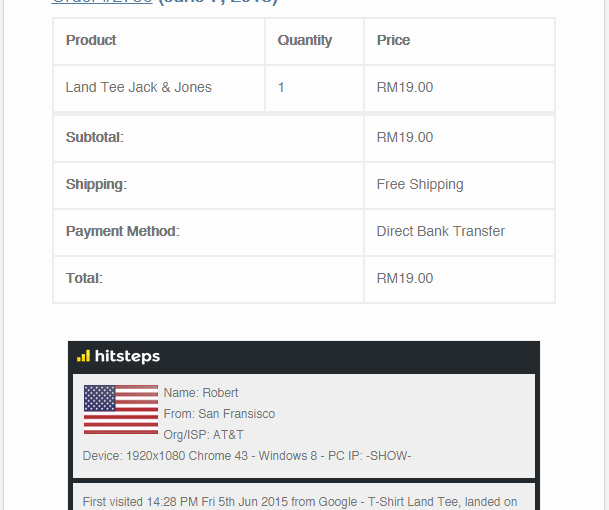
Hitsteps now Integrate with Contact form 7, Ninja Forms and Gravity Forms as well as WooCommerce New Order Emails in WordPress, so you will receive your customer full detail including IP Address, Location, Device and Browser Info, also their First Visit date and time, first referrer and first landing page, and list of their recent pageviews in your email when they buy from you or contact you!

Knowing source of your true customers never been easier. Helping and answering your visitors question could be more accurate and helpful when you know which pages they see before contacting you.

Grab your updated copy of Hitsteps WordPress plugin from here

Contact Form Analytics

We are proud to release a new product from hitsteps, Contact form analytics!

Please go to WordPress.org and update to newest version of Hitsteps plugin.

Have you ever wish to know more about those who email you from your website? Did you wish that there was an easy way to track those users, know their viewed pages, their device setting, their activity on your site, so that you can answer them and help them better? We are here to help!

If you been using hitsteps before, you know that we have advanced and very detailed web analytics system. Now that we have integrated contact forms with this analytics tool, Hitsteps will not change look of your current forms, it is just an invisible piece of code but it will revolutionize your contact form emails!

Currently we do support Gravity forms and our team is working on Contact form 7 support at moment., Contact form 7 plugins for WordPress. Custom API will be available for developers soon, so that you can integrate it to any website and web service.

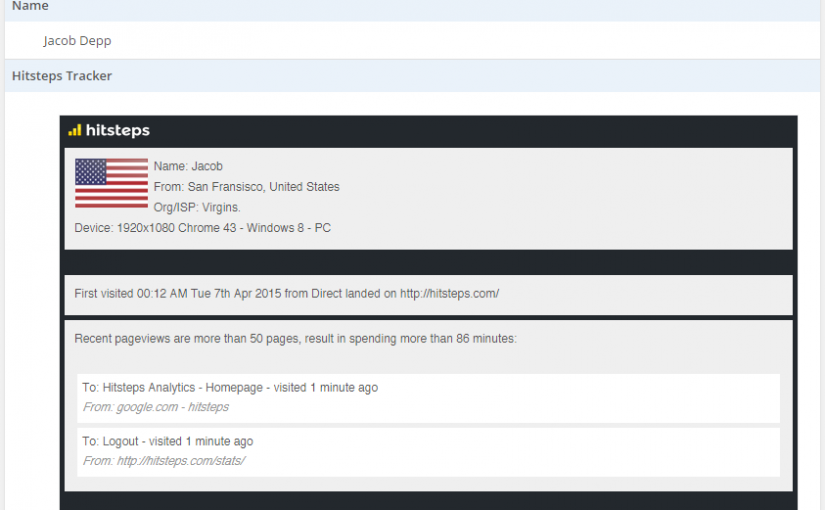
Once you install hitsteps analytics plugin and enable hitsteps widget in your contact form, you will be able to have something like above screenshot in all emails send from your website, happy supporting your customers even better than past, from now on!


We have switched to HTTPS (and why you should switch too)

5810_https

Hitsteps had HTTPS since beginning when we launch our service two years ago, but now it is default protocol for all new users. All new users who open hitsteps, they will automatically get forwarded to https version of our service. You can choose to view normal HTTP version if you would like to, after you logged in, but that would be your own choice (and we won’t ask you why!)

HTTPS sites will have extra boost for their ranking, it is not some myth SEO science, it is directly quoted by Google’s official blog. It is a rare thing that Google tell businesses how to improve their SEO,  and we are glad that Google announced this one publicly, as it is for goods of our clients, YOU and help have a safer web overall.

over the past few months we’ve been running tests taking into account whether sites use secure, encrypted connections as a signal in our search ranking algorithms. We’ve seen positive results, so we’re starting to use HTTPS as a ranking signal.
Quoted by Zineb Ait Bahajji and Gary Illyes in Google’s blog

so, did you get the hint? What are you waiting for!? contact your web hosting or developer and ask for HTTPS! If you are a hitsteps analytics user, please make sure HTTPS visitors tracking is supported in your current license to avoid missing any hits from being counted.

Hitsteps is faster than ever!

We have implemented few layer of optimization as well as active CDN networks in more than 33 countries around the world.

Our tracking code javascript have been automatically moved to CDN networks and it will load faster for your visitors result in faster load time for your website.

Additionally, all of hitsteps dashboard content will be cached in a CDN just near your location as well as your own browser, so you can expect very fast switching between sections of dashboard.

No matter where you are from, CloudFlare service will detect your location and serve our website to you at fastest speed possible.

Be careful, it is fast. don’t drink and analyze!

Web Analytics Whitelabel API

We are ready to expand and partner with be your new partner. Hitsteps have a new set of API functions that allow you to control almost everything which is related to your whitelabel brand and users under your whitelabel.

Our API command set is in PHP but it get input as POST return all data as JSON which make it up for a peaceful integration with almost every programming languages.

Here is list of commands we are currently offering (As of May 2015): Token based authentication, Search Account by Email, ID or Tracking API Key, Get account info, Get API Key from URL, Get list of tracking websites, Get list of accounts, Change email and password of users, Create a new account, Add a new website for tracking, Activate trial, Activate License for a specific duration, Convert licenses, get list of available plans, Get last 7 days pageviews and visits of websites, get auto-authenticated link to all report pages.

We have a full set of plugins we offer for WordPress and Joomla which we can rebrand them at your request. Are you ready? drop us a hint!

Hablamos Español!

Hola! We welcome a new language to join hitsteps list of languages! We officially support spanish language now.

This change has been applied automatically to all of our spanish speaking customers. You can change dashboard language using a dropdown box which we have put at bottom left of our homepage.

We have went ahead and applied multi-language support for our WordPress plugins, yes that is correct! Now you can have our chat widget and statistics widget in spanish language.

These widgets have ability to auto-detect your visitors location and show proper language to them. So chat interface will be in Spanish language for those who are in spanish speaking countries, German to german speaking countries and English to rest of world. or you can manually set language for them in WordPress Admin Dashboard -> Appearance -> Widgets