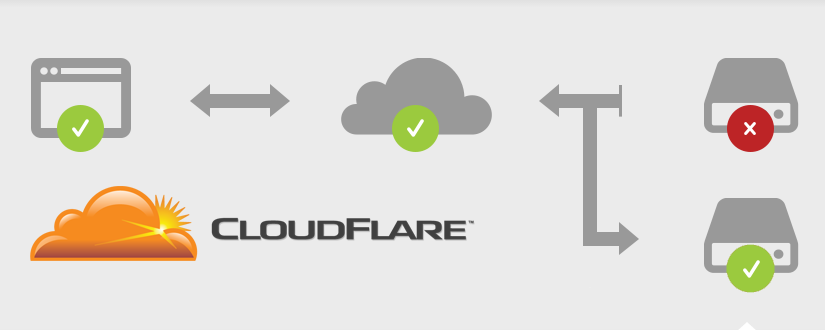
Reviewed and substantially updated in August 2026.
The old API-v1 script previously published on this page is obsolete and should not be used. Current Cloudflare automatic failover is built around Load Balancing: health monitors check origins, origins are grouped into pools, and a load balancer routes traffic according to health and steering policy.
This guide explains the current design, the prerequisites people often miss, and how to test a failure without turning a maintenance exercise into an outage.
What Cloudflare automatic IP failover does
Cloudflare Load Balancing is a paid add-on that can distribute traffic across origins and steer away from an unhealthy pool. Its core objects are:
- Monitor: the request Cloudflare sends and the conditions that count as healthy.
- Origin: an address and port serving the application.
- Pool: one or more origins, usually representing a location or failure domain.
- Load balancer: the hostname, pools, fallback pool, and steering policy presented to users.
This is different from simply publishing several A records. Plain round-robin DNS distributes answers but does not necessarily perform active health checks or promptly stop returning a failed origin. See DNS load balancing versus health-checked failover for the architecture trade-offs.
Before you configure failover
A second server is not automatically a safe failover target. Confirm these items first:
- Application parity: both origins run compatible code, configuration, dependencies, and scheduled jobs.
- Data consistency: decide how database writes, uploaded files, queues, and caches remain correct during and after a switch.
- Session behavior: use a shared session store, stateless sessions, or intentional session affinity. Do not assume an in-memory session exists on another server.
- TLS and host handling: each origin accepts the expected hostname and has the correct origin certificate/configuration.
- Network access: firewalls allow Cloudflare health probes and proxied traffic without unnecessarily exposing an administrative service.
- Capacity: the remaining healthy pool can handle the full expected load.
- Recovery ownership: an operator knows how to diagnose the failed origin and return it safely.
Design a useful health endpoint
A monitor should test the minimum path that proves the origin can serve real traffic. A TCP connection alone says that a port is open; it does not prove the application can answer correctly. Conversely, a check that depends on every downstream integration may cause unnecessary failover when a non-essential service has a brief problem.
A dedicated endpoint such as /healthz can return a small response with an expected status code and body. Consider whether it should verify:
- the web process is responsive;
- essential configuration is loaded;
- a critical database dependency is available;
- the application is ready to receive traffic rather than merely started.
Keep the response free of secrets and sensitive diagnostics. Protect the endpoint from expensive work, make its result deterministic, and document exactly what “healthy” means.
Configure failover in the Cloudflare dashboard
- Create the monitor. Choose protocol, port, path, method, expected status, optional expected body, timeout, interval, and consecutive success/failure thresholds. Cloudflare’s monitor documentation describes the available settings.
- Create a primary pool. Add the primary origin or origins and attach the monitor.
- Create a secondary pool. Put it in a genuinely separate failure domain where practical, then attach the same monitor or an intentionally different one.
- Choose the fallback pool. This is used if other pools are unavailable according to the configured logic, so it must be able to serve the application safely.
- Create the load balancer. Select the public hostname, default pool order, fallback pool, TTL/steering options, and any session-affinity behavior your application requires.
- Observe health before sending production traffic. Confirm every origin reports the expected state and investigate any flapping.
Cloudflare documents pool composition and health behavior in its Load Balancing pools guide. Names and dashboard placement can change; use the current documentation rather than copying an old screenshot or API call.
If you automate it, use scoped API tokens
Prefer the dashboard for a one-off setup. If infrastructure automation is necessary, use the current Cloudflare API and a narrowly scoped API token. Do not paste a Global API Key into a shell script, source repository, ticket, or monitoring URL. Store secrets in the deployment platform’s secret manager, limit permissions to the required zone/account resources, rotate credentials, and keep an audit trail.
Make automation idempotent: reading the current configuration and applying a defined desired state is safer than a script that blindly swaps addresses. Include validation and a rollback path.
Test the design before relying on it
- Record the normal pool and origin health state.
- Send a distinctive test request and confirm which origin serves it without exposing that marker to ordinary users.
- During a maintenance window, disable the primary origin in Cloudflare or make the dedicated test endpoint fail in a controlled way. Avoid crashing a production host merely to prove routing.
- Measure detection time, traffic transition, errors, session continuity, queued work, and user-visible behavior.
- Restore the primary, wait for consecutive successful checks, and confirm recovery does not cause a second disruption.
- Write down the evidence and adjust thresholds if normal latency causes false failures.
Also test a partial failure: an application can return HTTP 200 while logins, checkout, uploads, or database writes are broken. Synthetic checks for critical user journeys may be needed in addition to the routing health endpoint.
Monitoring and failover are separate responsibilities
Cloudflare’s monitor informs Cloudflare’s routing decision. An independent external monitor helps confirm what a user can reach and can alert an operator if all routes fail or the DNS/CDN layer itself is affected. Hitsteps uptime monitoring can be one external availability signal; analytics traffic is not a health check and should never control failover.
Keep alerts actionable: include the hostname, affected pool/origin, failing condition, start time, runbook, and owner. Avoid putting API tokens or sensitive health-response details in an alert URL.
Rollback plan
Before launch, export or document the prior DNS and Load Balancing configuration. Define who can:
- disable a failing origin;
- restore the previous pool order or hostname record;
- freeze writes if data consistency is uncertain;
- verify recovery from outside Cloudflare;
- reconcile sessions, queues, uploads, and database changes after the event.
Automatic routing reduces time spent sending users to a known unhealthy origin. It does not solve state replication, software defects, capacity shortfalls, or a dependency shared by every pool. Treat failover as one tested layer in a broader recovery plan.

WOW, Thanks, It's working fine for me….
Hello! Thanks a lot for your guide. Can you please share the page where you got the tobackup.sh and tomain.sh shell scripts? I want to be able to auto-point all of my Cloudflare sites instead of adding them manually in the shell scripts(domain1, domain2 etc)
They are attached with post. you can grab them here: the original download is no longer available
They are attached with post. you can grab them here: the original download is no longer available
Thank you very much, it is working like a charm. I used ddns.sh for APIv4 as yoy recommend