Live visitors
See who is on your Site right now, which page they are on and how long the visit has been open. Live visitor monitoring is on Free and higher plans.
Building a ChatGPT Site is fast, but knowing who visits it, which pages they open and where they came from should not be guesswork. Paste one prompt into the chat that built your Site, and Hitsteps starts showing live visitors, sources and page-by-page routes.
Hitsteps is hosted website analytics for live insight. It keeps its own counts on top of what the ChatGPT Sites built-in Analytics shows, so you see visits while they are still happening, with sources and page titles.
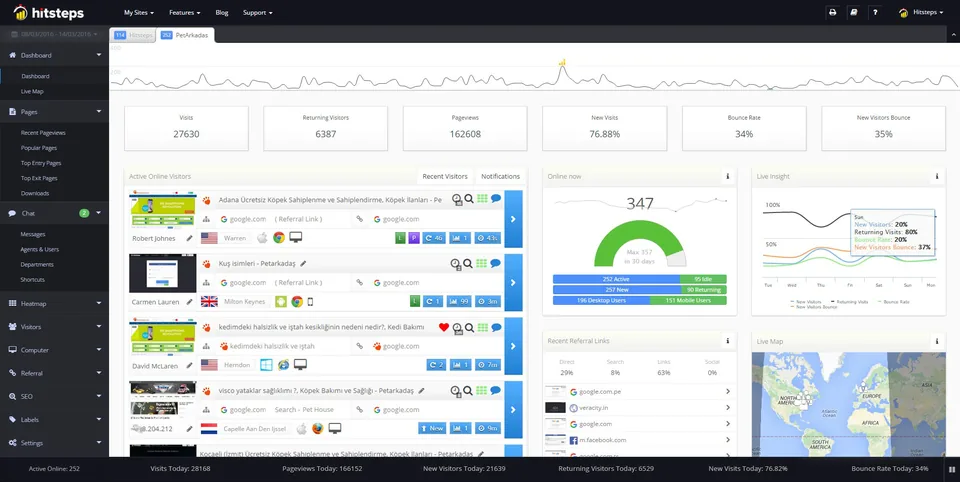
On 2026-11-14 one prompt installed Hitsteps on three private test Sites built by ChatGPT, and the tag stayed after a redesign each time. The first visit on the static test Site appeared in the Recent Pages list within about 36 seconds (a bounded sample; the other frameworks were not timed).
See who is on your Site right now, which page they are on and how long the visit has been open. Live visitor monitoring is on Free and higher plans.
Connect referrers, search engines and campaign links to the visit that followed. Visits that arrive from a recognized AI assistant such as ChatGPT are labeled as AI referrals instead of disappearing into "direct".
On static and standard single-page (History API) Sites, each page change records with its route and title, so you can follow a visitor through your product pages, not just count total views.
Open your own Site once and that first visit becomes your first real row in the dashboard, with its source and page. No waiting for a report cycle.
Before you paste, open the Hitsteps dashboard, go to the site Settings page and set the site's consent mode to match the notice your Site will show. Configure and verify the consent choice before you open the Site to visitors.
Hitsteps works with the chat that built your Site. Copy the prompt below, paste it into that conversation, wait for the confirmation, then open your Site once.
Your Hitsteps code is the 32-character tracking code for this site. Find it in the Hitsteps dashboard under the site's tracking settings, then paste it here so the prompt is ready to copy.
Your Hitsteps code goes here first.
The builder adds one script tag to the shared layout. Do not add a second snippet later; spa=1 in the tag already tracks page changes for navigation used by static and standard single-page Sites.
ChatGPT Sites Analytics counts unique visitors, page views and requests over time, without export or source breakdowns. Hitsteps on the same Site adds a different layer: who is live now, which pages with which titles, which referrers, campaigns and AI assistants, and the path of each visit.
Hitsteps does not report the hosting-usage number behind your ChatGPT Sites request allowance. It measures visitor behavior on the deployed Site, never server-side request accounting.
Hitsteps is independent software that loads like any script. It is not affiliated with or endorsed by OpenAI.
While you build a Site in ChatGPT, the conversation's preview pane loads the deployed page in an embed, and Hitsteps counts those loads as real visits from chatgpt.com. They can appear in your reports labeled "AI · ChatGPT". Treat those as your own previews, not outside traffic, and keep them separate from genuine external ChatGPT referrals, which arrive as clicks from people who found your Site through ChatGPT.
Exclude your own visits so your building time does not reshape the numbers. Open the Hitsteps dashboard, go to the site Settings page and use "Exclude this browser on <domain>", add your work IP to the excluded list, or use the "don't count this browser" option. Those controls are verified on the Site's own deployment domain; we have not tested them inside ChatGPT's preview embed, so preview views may still appear in a separate browsing context. Excluding one browser never suppresses a whole source: visitors who arrive from ChatGPT on other browsers keep counting as AI referrals.
Traffic sources and campaignsThe tracker uses first-party cookies, so the Site owner stays the data controller and decides what applies. The site's consent mode in the Hitsteps dashboard has four choices: always ask for full tracking; ask only when identifying information is being sent; track identifiable information with no popup; or track only non-identifiable information with no popup. When a visitor declines, cookie-based repeat detection, membership or user-ID tracking, and form-field tracking stop, while anonymous session-based analytics continues. Set the consent mode before you paste the install prompt and open the Site, add a cookie notice or banner on the Site where your law requires one, and verify one real incognito visit. Hitsteps adds no automatic consent workaround and makes no legal or storage promise.
The install prompt worked on all three test frameworks (static, Vite-style and one Next-style). Route tracking is reliable on static and History-API single-page (Vite-style) Sites today. For Sites that navigate with the browser Navigation API, like our Next-style test Site, the repaired loader was verified on test pages that reproduce that routing: completed client-route changes record with their settled titles and the previous route as the source, including rapid consecutive changes. It has not been re-run on the Next-style Site itself. The tests were a small private sample, so we do not promise every framework.
The ChatGPT preview pane counts as real visits and can show as "AI · ChatGPT". Use "Exclude this browser" and your IP block in the site Settings page so your building time stays out of your reports; exclusion inside the preview embed itself was not tested.
No. Built-in Analytics shows totals over time. Hitsteps adds live visitors, sources, page titles and routes. It does not report your hosting usage or request counts.
No. You paste one prompt into the chat that built the Site. That is the whole install.
Allow https://edgecdnplus.com in script-src, img-src and connect-src. In bounded tests on test pages, a strict policy without 'unsafe-eval' set as a response header or as a meta tag kept page views, client routes and live-visitor presence pings working, and consent choices worked. Not every policy or framework was tested.