Maintained for real websites
Hitsteps has kept evolving across website platforms, browser changes, analytics shifts, and store workflows.
Mixpanel is a strong product analytics platform built around events, funnels and retention. Hitsteps fits better when your team runs a website and wants to see live visitors as they browse, check heatmaps from Growth, and chat with visitors from Starter, all in one hosted dashboard, without planning and instrumenting events first.
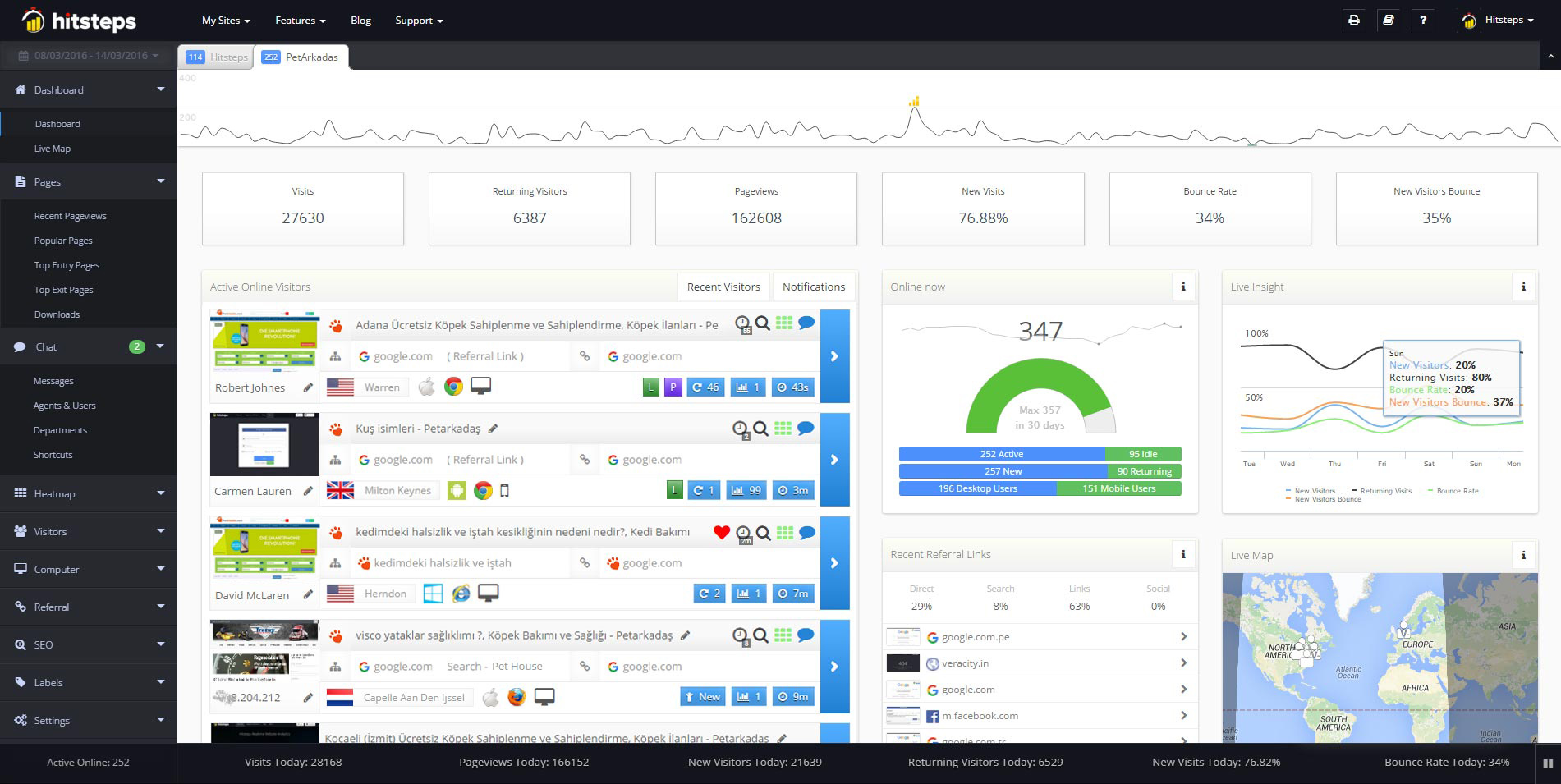
Use it when you need live visitor context, practical installation routes, and action tools around the traffic you already have.
Hitsteps has kept evolving across website platforms, browser changes, analytics shifts, and store workflows.
WordPress, Shopify, Wix, Google Tag Manager, HTML, CMS, commerce, browser, and desktop setup paths are documented from one hub.
Live dashboard, visitor profiles, heatmaps, chat, Segments, uptime, reports, and alerts stay connected after tracking is installed.



Hitsteps shortens the path from "someone is on the site" to doing something about it: open the live visitor, check where they came from, filter with Segments, look at heatmaps from Growth and start a chat from Starter, without leaving the dashboard and without shipping tracking code for every question.
Mixpanel stays the stronger pick for product teams that instrument apps and live in funnels, retention, cohorts and experiments at event scale. Hitsteps leads when the daily job is watching and winning the website visit.
Mixpanel documents event-based pricing across Free, Growth and Enterprise plans, with funnels, retention, cohorts, experiments and session replay on top of instrumented events. Hitsteps puts live visitors, Segments, heatmaps (from Growth) and chat (from Starter) in one hosted dashboard that starts from a tracking code.
| Feature | Mixpanel (checked 26 Oct 2026) | Hitsteps |
|---|---|---|
| What it is | Event-based product analytics: your team defines events, and Mixpanel computes funnels, retention, cohorts and experiments from them (Pricing). | Website visitor analytics: traffic, live visitors, Segments, goals, heatmaps and chat from one tracking code. |
| Setup | Instrumentation first: a tracking plan plus SDK or tag work before reports mean anything. Mixpanel suggests starting on Free "to test it out" and upgrading "once you have an estimate of your project's volume" (Pricing docs). | Paste one tracking code (or use the WordPress plugin) and watch your own visit arrive. No tracking plan, no SDK release. |
| Visitor-level live work | Profiles and cohorts built from your events, made for product analysis over time rather than watching the current visit. | Live visitor details sit at the center so teams can look at a visit and respond while it's happening. Hitsteps doesn't record sessions. |
| Funnels and retention | Funnels, retention, cohorts, experiments and feature flags are the core surface, all computed from instrumented events (Pricing). | Goals from Starter (3), Growth (5), up to 50 on Business, connected to Segments and visitor details. |
| Session replay and heatmaps | Session replay included: 10K replays a month on Free and 20K a month on Growth, more on higher volumes (Pricing). | Click heatmaps from Growth at $9.99 (2,000 clicks a day), more on higher plans. Hitsteps doesn't record sessions. |
| Live chat | Not listed on Mixpanel's public pricing page (checked 26 Oct 2026). Pricing. | Live chat from Starter at $4.99, beside the live visitor list. |
| How you pay | Per event ingested: Free covers up to 1M events a month, Growth starts at $0 with the first 1M free each month and usage rates above that, Enterprise is custom (Pricing, Pricing docs). | Per pageview, flat: Free ($0, 2,000 pageviews), Starter ($4.99), Growth ($9.99), Pro ($21.99), Business ($49.99), Scale ($99.99). |
| When to choose which | Choose Mixpanel when a product team instruments an app and needs funnels, retention, experiments and session replay at event scale. | Choose Hitsteps when a website needs live visitors, heatmaps from Growth and chat from Starter today, with no instrumentation project. |
Mixpanel answers come after a tracking plan, SDK work and event volume. Hitsteps shows the visitors themselves, so your team can see where each one came from while the visit is still open.
Heatmaps from Growth and live chat from Starter sit next to live visitors, Segments and goals. Checking a page and replying to a visitor happen in one place.
Hitsteps runs the analytics for you. Free to start, paid plans from $4.99, and every new account gets a 7-day Pro trial with no card. No event meter to watch.
Checked 26 Oct 2026. Mixpanel bills events per month; Hitsteps bills pageviews per month.
Mixpanel (pricing, pricing docs):
Hitsteps:
The Mixpanel details above were checked against Mixpanel's own pricing page and pricing docs on 26 Oct 2026.
Mixpanel is a trademark of Mixpanel, Inc. Hitsteps is not affiliated with or endorsed by Mixpanel.
Comparing event-based product analytics too? Our Woopra comparison covers the same lane. Woopra comparison
Mixpanel itself has a free plan: $0 for up to 1M events a month. The catch for simple websites is the setup: you must plan and instrument events before the reports mean anything. Hitsteps has a hosted Free plan with live visitors, 2,000 pageviews a month and 14 days of history, starting from one tracking code.
For a content or brochure site it is heavy: Mixpanel is built around a tracking plan and SDK instrumentation, and its own docs suggest starting on Free until you can estimate the project volume. Hitsteps needs one tracking code or the WordPress plugin, and your own visit shows up live right away.
As of 26 Oct 2026, Mixpanel bills events: Free covers 1M a month, Growth starts at $0 with the first 1M free and usage rates above that, and Enterprise is custom. Hitsteps bills pageviews flat: Free, then Starter at $4.99, Growth at $9.99, Pro at $21.99 and Business at $49.99 a month.
Live chat is included from Starter at $4.99 a month. Heatmaps are included from Growth at $9.99 a month.
Yes. Every new account starts with a 7-day Pro trial, and no card is needed. After the trial you can stay on Free, which includes the live visitor view, as long as your email is verified and your site fits Free's limits (up to 2,000 pageviews a month, 1 site), or choose a paid plan.
Create a free Hitsteps account to see live visitors, Segments and goals, with heatmaps from Growth and chat from Starter, without an instrumentation project.