Maintained for real websites
Hitsteps has kept evolving across website platforms, browser changes, analytics shifts, and store workflows.
Adobe Analytics gives teams detailed web and mobile analysis with custom events, segmentation and Analysis Workspace. That depth is useful when you have complex reporting needs. Hitsteps fits a smaller daily task: understand website traffic, inspect a live visit and see where people click.
Hitsteps starts with one website tracking snippet, a live visitor view on Free, chat from Starter at $4.99 a month and click heatmaps from Growth at $9.99. Adobe Analytics uses a tailored quote; its public pricing page does not show a fixed dollar price.
Use the comparison below to decide, then follow the setup steps to check Hitsteps on your own website.
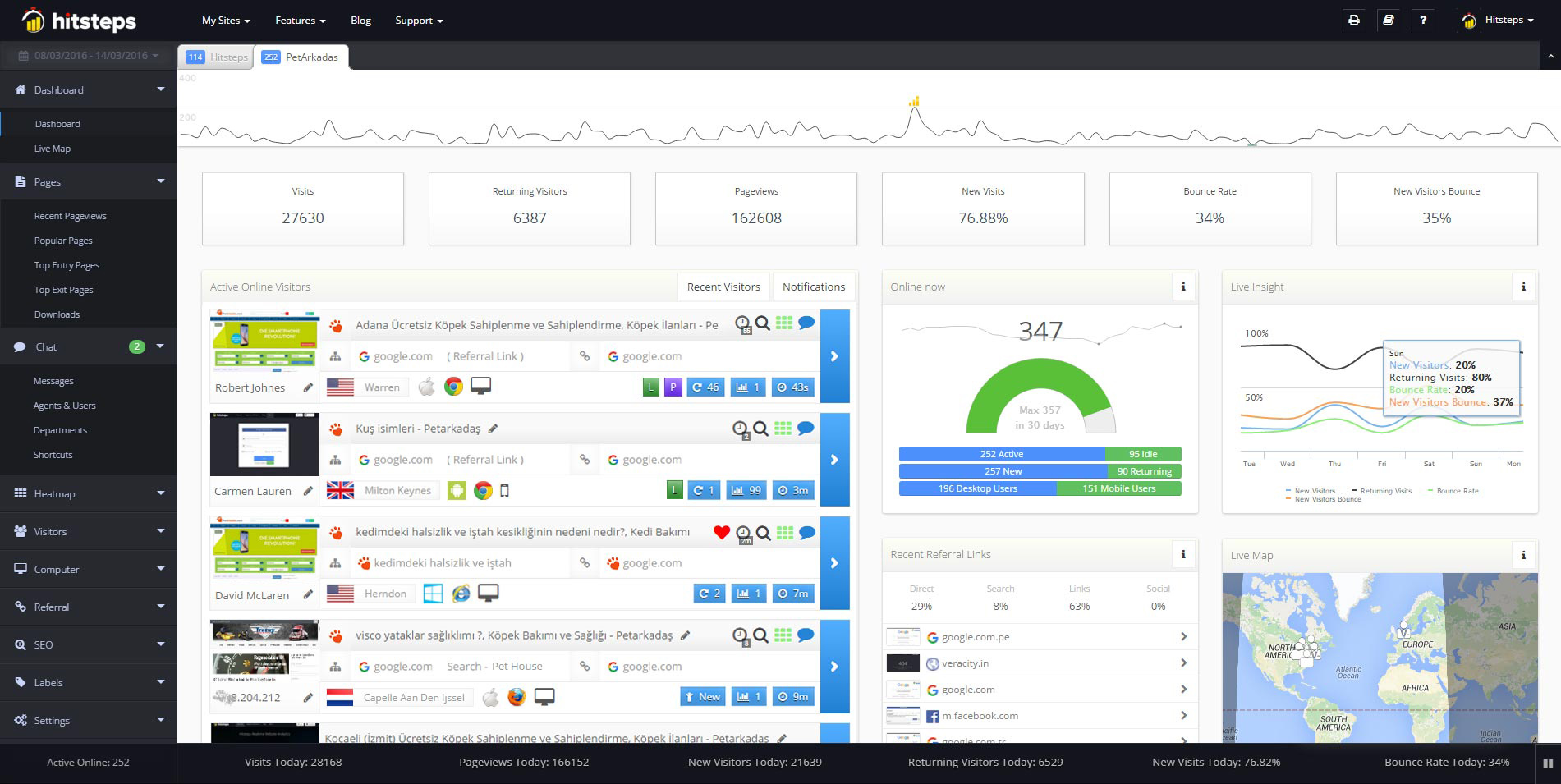
Use it when you need live visitor context, practical installation routes, and action tools around the traffic you already have.
Hitsteps has kept evolving across website platforms, browser changes, analytics shifts, and store workflows.
WordPress, Shopify, Wix, Google Tag Manager, HTML, CMS, commerce, browser, and desktop setup paths are documented from one hub.
Live dashboard, visitor profiles, heatmaps, chat, Segments, uptime, reports, and alerts stay connected after tracking is installed.



Choose Adobe Analytics when your team needs Analysis Workspace, custom reporting, detailed segmentation, Flow, Fallout and cohort analysis, with Adobe ecosystem integrations. Plan collection and report-suite configuration with an Analytics administrator. Adobe Analytics features.
Choose Hitsteps when a site owner, marketer or small team wants website reporting with published plans and a direct path from a tracking snippet to live visitors. Start with traffic, then use paid-plan goals, heatmaps and chat as needed.
| What you need | Hitsteps | Adobe Analytics |
|---|---|---|
| Main workflow | A hosted website dashboard for traffic sources, live visitor details, Segments and paid-plan goals, heatmaps and chat. | Detailed web and mobile analytics: Analysis Workspace, custom events and metrics, segmentation and Adobe integrations. Adobe Analytics features. |
| Getting started | Create an account, add your site and paste its tracking code, or use the WordPress plugin. Open your site and watch your own visit arrive. | Plan the collection implementation and report-suite configuration. Adobe documents administrator access and an Analytics tag property in its report-suite setup guide. |
| Goals and funnels | Goals from Starter; ordered funnels from Pro. Explore traffic with Segments and visitor details. | Flow, Fallout and cohort analysis help teams explore journeys and drop-offs. Adobe Analytics features. |
| Click heatmaps | From Growth, $9.99 a month. Compare where visitors click with the traffic reaching that page. | Assess page-interaction reporting and any extra visualization tools against your Adobe package. This comparison does not assume heatmaps are included in every contract. Adobe pricing. |
| Chat with a visitor | Live chat from Starter, $4.99 a month, alongside the live visitor view. | Adobe Analytics is an analysis product. Confirm any visitor-chat requirement and its licensing separately within your chosen Adobe or support stack. Adobe Analytics features. |
| Free plan | $0: up to 2,000 pageviews a month, 1 site and 14 days of history. Live visitor view included; chat, goals and heatmaps require paid plans. | The public pricing page directs buyers to a tailored quote and lists no self-service Free plan. Adobe pricing. |
| Paid pricing | Monthly pageview plans include Starter $4.99, Growth $9.99, Deluxe $15.99, Pro $21.99 and Business $49.99, with higher-volume plans available. Features and limits depend on the plan. | Select, Prime and Ultimate packages with tailored pricing. No fixed public dollar price is shown; contact Adobe for your scope and volume. Adobe pricing. |
Checked 26 Oct 2026 against Adobe pricing, Adobe Analytics features and the report-suite setup guide. Adobe contracted usage and Hitsteps pageviews are not equivalent units. This page compares Adobe Analytics, not the separate Customer Journey Analytics product. Adobe is not affiliated with or endorsing Hitsteps.
Adobe Analytics deserves consideration when your team has complex web and mobile reporting, an established Adobe setup and people who own the analytics implementation. Analysis Workspace, segmentation, custom metrics and Flow/Fallout support detailed investigation. A smaller website may get more value from a focused dashboard it will use every day.
1. Sign in to your Hitsteps account and add your website. 2. Copy the tracking snippet generated for that site and paste it into your website, or use the WordPress plugin. 3. Open your website, return to the live visitor view and check that your visit arrives. The setup guide walks through the steps.
Example only. Copy the complete tracking code generated for your website in Settings.
<script async src="https://edgecdnplus.com/code?code=YOUR_SITE_CODE"></script>New accounts start with a 7-day Pro trial, no card needed. After the trial, stay on Free with a verified email and a site within the Free limits, or choose a paid plan. Chat starts on Starter; heatmaps start on Growth.
Comparing other options? Read our Google Analytics comparison, our Amplitude comparison, or browse all comparisons.
It can fit a website whose needs are traffic reports, a live visitor view, goals, chat and click heatmaps. It is not a feature-for-feature replacement for every enterprise implementation. Map the Adobe reports, integrations and workflows you rely on before changing tools.
Adobe publishes tailored pricing rather than a fixed dollar amount on its public pricing page, checked 26 Oct 2026. Request a quote for the package, implementation scope and usage you need. Hitsteps has public pageview plans, including Free and Starter at $4.99 a month.
Its public pricing page lists packages and a quote request rather than a self-service Free plan. Hitsteps Free includes a live visitor view, up to 2,000 pageviews a month, 1 site and 14 days of history. Chat, goals and heatmaps require a paid plan.
No. Adobe lists them as separate products in its broader analytics portfolio. This comparison concerns Adobe Analytics for web and mobile. Check the exact Adobe product and package before comparing features or quotes.
Create an account, add your website and copy its generated tracking snippet into the site, or use the WordPress plugin. Open your site and look for your visit in the live view. A new account gets a 7-day Pro trial with no card; after that, choose Free within its limits or a paid plan.