Download-link events
Record compatible clicks on linked files when the tracker can observe the browser event before navigation.
See when a tracked visitor clicks a compatible download or link that leads away from your website. Hitsteps can connect supported click events to available journey context, while browser navigation, consent, blockers, and custom site behavior can affect capture.
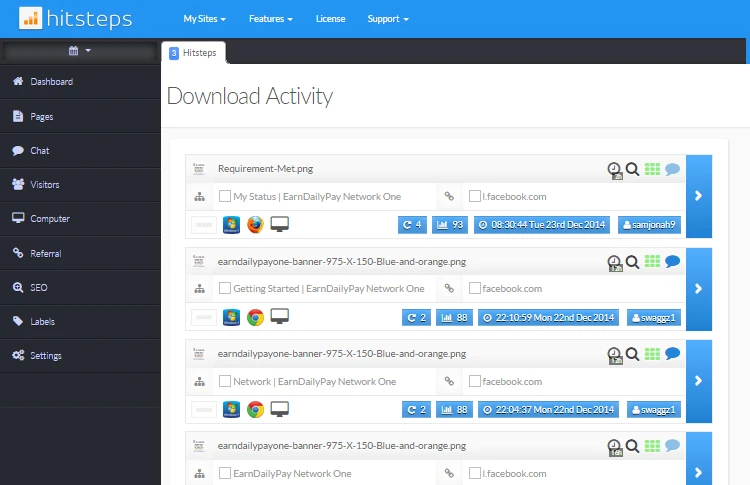
A visitor can take an important action by opening a PDF, downloading a file, or following a partner link. Capturing that supported click keeps it from disappearing when the next page is outside your website.
Record compatible clicks on linked files when the tracker can observe the browser event before navigation.
Capture supported clicks to another domain so the action can appear in external-link reporting.
Review the captured action near the available visitor, page, source, device, and session context.
Use it when you need live visitor context, practical installation routes, and action tools around the traffic you already have.
Hitsteps has kept evolving across website platforms, browser changes, analytics shifts, and store workflows.
WordPress, Shopify, Wix, Google Tag Manager, HTML, CMS, commerce, browser, and desktop setup paths are documented from one hub.
Live dashboard, visitor profiles, heatmaps, chat, Segments, uptime, reports, and alerts stay connected after tracking is installed.



Use download and external-link events to understand intent on your site. Confirm completed downloads, purchases, registrations, or other off-site outcomes with the system that owns that outcome.
Confirm Hitsteps loads on the page that contains the download or external link and follows the configured consent flow.
Click each important file and outbound-link pattern in a test visit, including links generated by menus or dynamic components.
Open the relevant Hitsteps report or visitor journey and check the link target and page context.
If a JavaScript component or application bypasses ordinary links, use an available custom-event integration or revise the implementation.
Measure clicks on brochures, white papers, manuals, media kits, and other linked files.
Count supported outbound clicks while recognizing that conversion on the destination requires separate attribution data.
See when visitors leave documentation for a repository, app store, external console, or another service.
Clear answers about what this feature reports, how to use it, and where its limits are.
It can capture compatible link clicks observed by the tracking code. Dynamic applications, scripted navigation, unusual file delivery, blockers, or consent choices may require testing or custom event setup.
No. The event records the observed link action. Browser behavior, permissions, network errors, or the user can still prevent the file from being fully downloaded or saved.
Not from the outbound click alone. Hitsteps records the supported action on your tracked site; activity on another site requires authorized tracking and attribution on that destination.
Connect this report with the surrounding visitor, acquisition, and workflow context.
Create a free account, install the Hitsteps tracking code, and confirm your first visit before choosing the plan that fits your traffic and reporting needs.