Available term ranking
Order supplied search terms by their tracked visit activity within the selected reporting period.
Hitsteps groups the search terms that are actually supplied with tracked visits so you can compare their frequency, landing pages, and available journey context over a selected period.
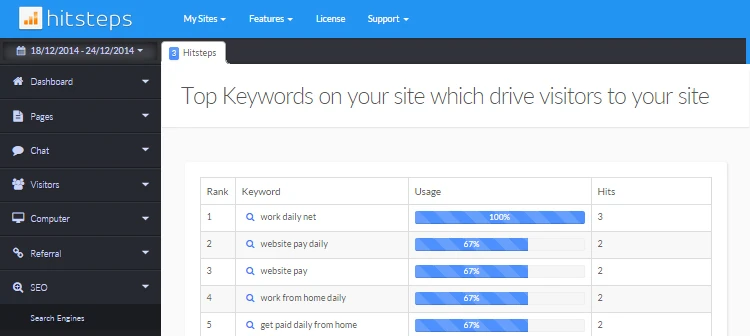
Use the terms that arrived as directional evidence, while keeping withheld queries outside the ranking and avoiding unsupported conclusions about total search demand.
Order supplied search terms by their tracked visit activity within the selected reporting period.
Change the reporting window to see whether known terms become more or less common after content and campaign changes.
Open an available keyword to review matching visits, landing pages, and other tracked context.
Use it when you need live visitor context, practical installation routes, and action tools around the traffic you already have.
Hitsteps has kept evolving across website platforms, browser changes, analytics shifts, and store workflows.
WordPress, Shopify, Wix, Google Tag Manager, HTML, CMS, commerce, browser, and desktop setup paths are documented from one hub.
Live dashboard, visitor profiles, heatmaps, chat, Segments, uptime, reports, and alerts stay connected after tracking is installed.



The report orders terms found in available tracked visit data. It does not measure impressions, total searches, keyword difficulty, or the position at which your page appeared in search results.
Use equivalent periods when comparing keyword patterns so weekday, season, and campaign timing do not dominate the result.
Keep withheld and unavailable queries separate; the visible ranking covers known terms rather than all organic search visits.
Check which landing pages received each known term and whether the associated visits completed useful tracked actions.
Use first-party webmaster tools when you need impressions, clicks, positions, or broader query coverage that referral analytics cannot supply.
Identify supplied terms that repeatedly describe the problem, product, or topic in your visitors' own words.
Check whether frequently supplied terms lead to pages that answer the apparent need clearly.
Compare known-term patterns before and after publishing, campaign, or site changes without treating them as total demand.
Clear answers about what this feature reports, how to use it, and where its limits are.
No. It includes only terms supplied through available referral or campaign data. Major search engines withhold many organic queries, so the report is necessarily incomplete.
No. Top refers to its frequency within the available tracked keyword data, not your page's position in a search engine or the term's overall search volume.
Yes. Choose comparable date ranges and review the supplied terms, landing pages, and outcomes together. Remember that query withholding and attribution changes can also affect the comparison.
Connect this report with the surrounding visitor, acquisition, and workflow context.
Create a free account, install the Hitsteps tracking code, and confirm your first visit before choosing the plan that fits your traffic and reporting needs.