Maintained for real websites
Hitsteps has kept evolving across website platforms, browser changes, analytics shifts, and store workflows.
If you use Jetpack Stats and keep running into its limits, you are probably looking at one of three things: UTM, device and city reports sit in Paid Stats, Jetpack's pricing table labels the free tier "Personal sites only", or you want to see what a visitor actually did. Jetpack Stats is a good fit when you want to open WordPress and see how your posts, pages and audience are doing. Hitsteps is for the next question: what did this visitor do on your site, and can your team act on it? Both have a WordPress plugin.
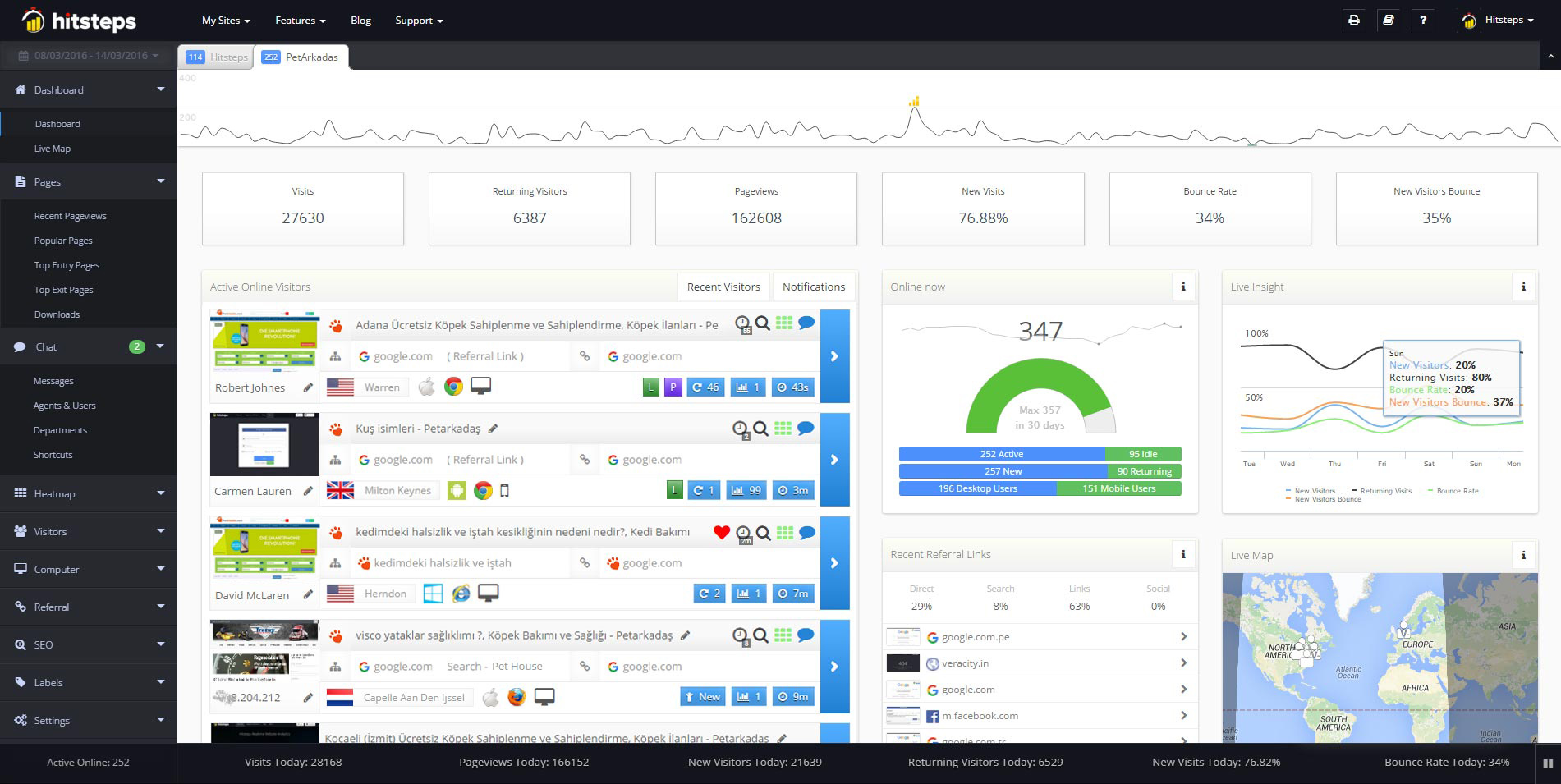
Use it when you need live visitor context, practical installation routes, and action tools around the traffic you already have.
Hitsteps has kept evolving across website platforms, browser changes, analytics shifts, and store workflows.
WordPress, Shopify, Wix, Google Tag Manager, HTML, CMS, commerce, browser, and desktop setup paths are documented from one hub.
Live dashboard, visitor profiles, heatmaps, chat, Segments, uptime, reports, and alerts stay connected after tracking is installed.



Pick Jetpack Stats if your work centers on posts, authors, subscribers and simple traffic reports inside WordPress. Its free reporting includes views, visitors, referrers, top content and full history. Paid Stats adds UTM, device, region and city reports. (Jetpack Stats; Jetpack's Free or Paid guide, checked 17 Oct 2026.)
Pick Hitsteps if you want to open a live visitor profile, follow the pages they viewed and have live chat alongside your analytics. The live visitor view is on Free. Chat starts on Starter at $4.99 a month, click heatmaps on Growth at $9.99 and funnels on Pro. The WordPress plugin adds tracking and links from the WordPress dashboard to the live view.
Jetpack Stats gives publishers a quick read on traffic and content. Its FAQ says "See real-time visitors, likes, comments, referrers, countries, top-performing content, link clicks, video plays, file downloads, subscribers, and social reach from one dashboard." Its product page also describes WooCommerce order, refund, shipping and product trends. That is useful if your day starts in the WordPress editor and you want to know what readers respond to. (Jetpack Stats, checked 17 Oct 2026.)
Hitsteps starts with live visitors and their page paths. Its WordPress analytics setup uses an API key, and the WordPress dashboard widget links to the full Hitsteps live dashboard. If you need to talk to a visitor while checking their journey, Starter adds one chat agent. Growth adds click heatmaps, while Pro adds funnels that measure where visitors drop out of a path.
| Question | Hitsteps | Jetpack Stats |
|---|---|---|
| Can I use it on WordPress? | Yes. Install the plugin, add your Hitsteps API key, then check the dashboard widget. | Yes. Install the plugin and open Stats in WordPress. |
| What can I see live? | Real-time visitor tracking with visitor profiles and page paths. The live visitor view is included on Free. | "See real-time visitors, likes, comments", per Jetpack's Stats FAQ (checked 17 Oct 2026). Its FAQ also says site owners cannot see which specific users viewed a post. |
| Can I review content and sources? | Referrers, pages, campaigns and visitor journeys. | Top posts, authors, referrers, countries and subscribers. |
| Can I follow tagged campaigns? | UTM campaign context is supported. | UTM reports are in Paid Stats. |
| Are click heatmaps listed? | Yes, click heatmaps from Growth. | Click heatmaps are not listed on Jetpack's public pages (checked 17 Oct 2026). Jetpack shows a geographic heatmap, which answers a different question. |
| Are funnels listed? | Yes, from Pro. | Funnels are not listed on Jetpack's public pages (checked 17 Oct 2026). |
| Is live chat listed? | Yes, from Starter, with one chat agent. | Live chat is not listed on Jetpack's public pages (checked 17 Oct 2026) for Stats. |
| What about WooCommerce? | WooCommerce revenue and visitor context are described in the WordPress integration; Commerce analytics is included on Pro and higher. | Jetpack lists WooCommerce orders, refunds, shipping and product trends in Stats. |
Jetpack column sources: Stats product page and FAQ, Stats support overview, Free or Paid guide and Jetpack pricing, all checked 17 Oct 2026.
Hitsteps uses monthly billing. Free covers one site below 2,000 pageviews a month. Starter is $4.99 a month for two sites below 10,000 pageviews, with one chat agent. Growth is $9.99 a month for five sites below 50,000 pageviews, with click heatmaps. Pro is $21.99 a month for 30 sites below 500,000 pageviews, with funnels and Commerce analytics. Larger sites can move up to Business at $49.99 a month for 100 sites, and there are higher tiers beyond that. See all plans before choosing a tier.
Jetpack offers free basic Stats and a separate Paid Stats option that starts at 10,000 site views a month. Its Stats FAQ quotes Paid Stats "from $8.33/month billed annually", and prices vary by currency. Jetpack Growth and Complete bundles include Paid Stats allowances of 10,000 and 100,000 monthly views. Jetpack notes that its bundle discount is for the first year only and renewals are at full price, so compare renewal prices too. (Jetpack Stats; Jetpack pricing; Paid Stats tiers, checked 17 Oct 2026.)
Free Stats on a commercial site: Jetpack's own pages differ here. Its Free or Paid guide says free Stats is "available for free" for "any type of site, any amount of traffic", while its pricing table lists the free tier as "Personal sites only" and describes the Stats row as a "Monthly page-view cap for commercial-use sites". Its feature support page says "Commercial sites require a Commercial Stats License." (All three checked 17 Oct 2026.) If your site sells something or runs ads, confirm eligibility with Jetpack, or plan for Paid Stats or a Growth or Complete bundle.
For a self-hosted WordPress site, install the Hitsteps plugin, enter your API key and open your site to check that a live visit appears. A free Hitsteps account includes a 7-day Pro trial, no card. After that, choose a plan based on your monthly pageviews and the features you use. WordPress.com sites need a plan that allows the required custom code.
If your main job is editorial reporting, start with Jetpack Stats. If your team needs visitor paths, live chat or click heatmaps as well, try Hitsteps on a real WordPress visit and see whether that extra context helps you act. Comparing with Google Analytics too? See Hitsteps vs Google Analytics for WordPress.
A free Hitsteps account includes a 7-day Pro trial, no card.
Yes, if you need visitor paths and live chat with your traffic data. Jetpack Stats is a strong choice for WordPress content and audience reporting, including posts, authors and subscribers. (Jetpack Stats, checked 17 Oct 2026.)
Jetpack says its site owners cannot see which specific users or accounts viewed a post. Hitsteps offers visitor profiles and page paths, so you can inspect a visit in more detail. (Jetpack Stats FAQ, checked 17 Oct 2026.)
Jetpack shows a heatmap of where visitors are located. Click heatmaps are not listed on Jetpack's public pages (checked 17 Oct 2026). Hitsteps offers click heatmaps from Growth. (Jetpack Stats FAQ, checked 17 Oct 2026.)
Jetpack's own pages differ here. Its Free or Paid guide says free Stats is available for any type of site, while its pricing table lists the free tier as "Personal sites only" and sets view caps for commercial-use sites, and its feature support page says "Commercial sites require a Commercial Stats License." (All three checked 17 Oct 2026.) If your site sells something or runs ads, confirm eligibility with Jetpack, or plan for Paid Stats or a Growth or Complete bundle.
Yes. A free account includes a 7-day Pro trial, no card. After the trial you can stay on Free, which includes the live visitor view, as long as your email is verified and your site fits Free's limits (up to 2,000 pageviews a month, 1 site), or choose a paid plan. You can create an account and test the WordPress setup on your own site.