1
פתיחת הוספת תוסף חדש
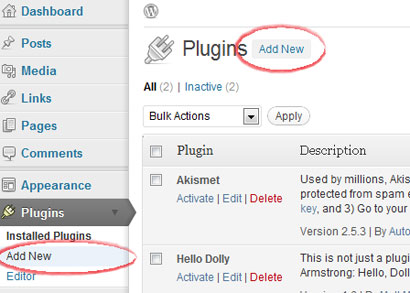
התחברו ללוח הניהול של WordPress, פתחו את תוספים ואז בחרו הוספת תוסף חדש.
תוסף CMS
אתרי WordPress באחסון עצמי יכולים להשתמש בתוסף Hitsteps מלוח הניהול של WordPress. אתרי WordPress.com תומכים ב-JavaScript באופן מוגבל, לכן השתמשו בשיטת הווידג׳ט רק כאשר התוכנית שלכם מאפשרת זאת.
 מומלץ WordPress באחסון עצמי
 מדריך התקנה
התחברו ללוח הניהול של WordPress, פתחו את תוספים ואז בחרו הוספת תוסף חדש.
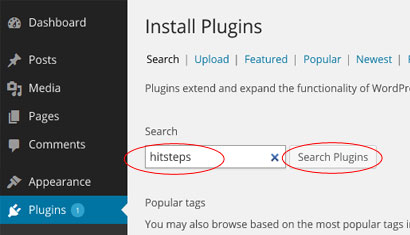
חפשו את תוסף ניהול המבקרים של Hitsteps בספריית התוספים.
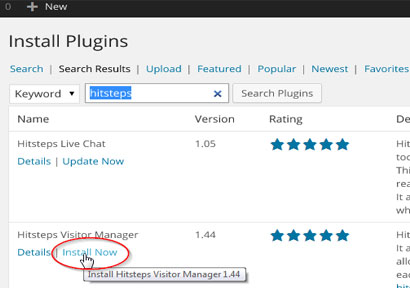
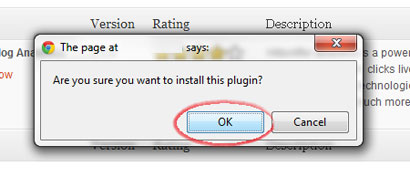
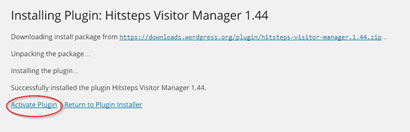
לחצו על התקנה עכשיו, אשרו את ההתקנה ואז הפעילו את התוסף.
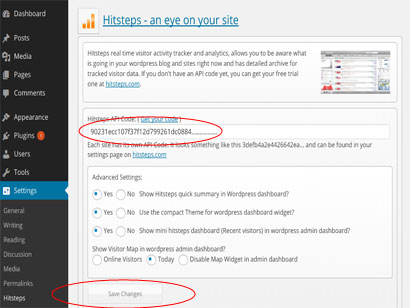
פתחו את הגדרות התוסף של Hitsteps, הדביקו את מפתח ה-API ושמרו.
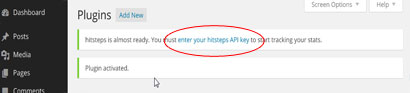
לאחר שהמעקב מתחיל, WordPress יכול להציג סיכום מהיר ולקשר אתכם ללוח הבקרה החי המלא של Hitsteps.
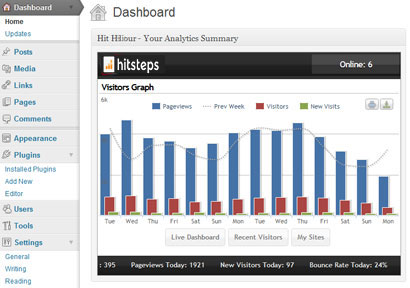
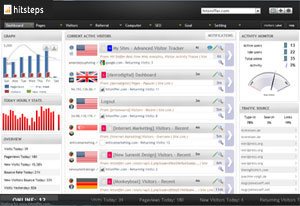
אחרי ההתקנה
WordPress analytics workflows
Hitsteps brings the WordPress signals teams use for acquisition, conversion review, support, and reporting into one practical workflow.
Review clicks, impressions, CTR, average position, queries, and pages from your verified Google Search Console property.
Record WooCommerce order revenue and successful supported form submissions, then connect them to available visitor source and recent journey context.
Use goals, campaigns, funnel and conversion reports, exports, scheduled reports, and AI assistance to decide what to do next.
WordPress use cases
Start with the question your WordPress team needs to answer, then follow the visitor, source, conversion, or report context that supports the next decision.
Review UTM source and campaign attribution, order revenue, landing page, recent journey, and available visitor context around a purchase.
Measure successful supported form submissions and add available journey context so a sales or support team can understand what happened before the inquiry.
Compare Search Console queries and pages with live sources, top content, returning visitors, and page behavior.
Use multi-site access, PDF or CSV exports, scheduled reports, live paths, and AI-assisted summaries across client properties.