1
Buka Tambah Pengaya Baru
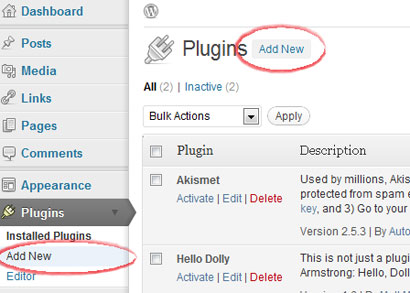
Masuk ke area pengelola WordPress, buka Pengaya, lalu pilih Tambah Baru.
Pengaya CMS
Situs WordPress yang di-host sendiri dapat memakai pengaya Hitsteps dari area pengelola WordPress. Situs WordPress.com memiliki dukungan JavaScript terbatas, jadi gunakan metode widget hanya jika paket Anda mengizinkannya.
 WordPress yang di-host sendiri direkomendasikan
 Panduan instalasi
Masuk ke area pengelola WordPress, buka Pengaya, lalu pilih Tambah Baru.
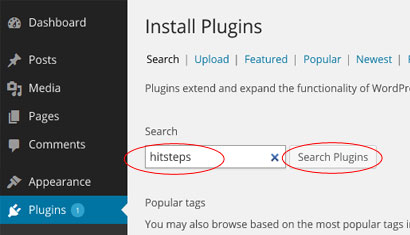
Cari pengaya pengelola pengunjung Hitsteps dari direktori pengaya.
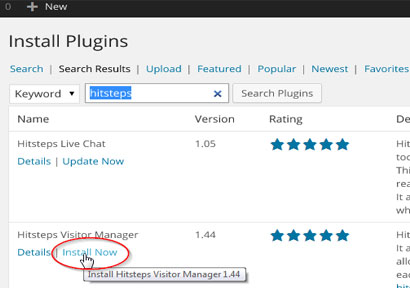
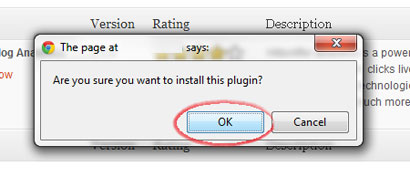
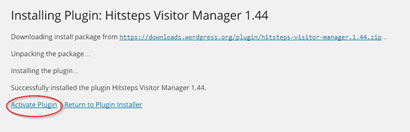
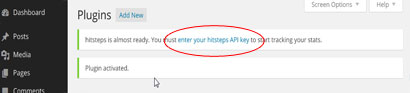
Klik Pasang Sekarang, konfirmasi pemasangan, lalu aktifkan pengaya.
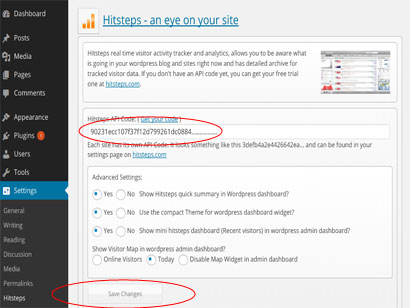
Buka pengaturan pengaya Hitsteps, tempel kunci API Anda, lalu simpan.
Setelah pelacakan dimulai, WordPress dapat menampilkan ringkasan cepat dan menautkan Anda ke dasbor langsung Hitsteps lengkap.
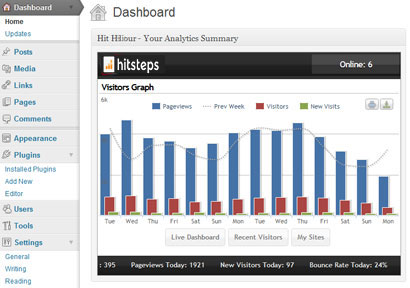
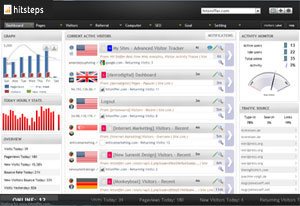
Setelah instalasi
WordPress analytics workflows
Hitsteps brings the WordPress signals teams use for acquisition, conversion review, support, and reporting into one practical workflow.
Review clicks, impressions, CTR, average position, queries, and pages from your verified Google Search Console property.
Record WooCommerce order revenue and successful supported form submissions, then connect them to available visitor source and recent journey context.
Use goals, campaigns, funnel and conversion reports, exports, scheduled reports, and AI assistance to decide what to do next.
WordPress use cases
Start with the question your WordPress team needs to answer, then follow the visitor, source, conversion, or report context that supports the next decision.
Review UTM source and campaign attribution, order revenue, landing page, recent journey, and available visitor context around a purchase.
Measure successful supported form submissions and add available journey context so a sales or support team can understand what happened before the inquiry.
Compare Search Console queries and pages with live sources, top content, returning visitors, and page behavior.
Use multi-site access, PDF or CSV exports, scheduled reports, live paths, and AI-assisted summaries across client properties.