1
Apri Aggiungi nuovo plugin
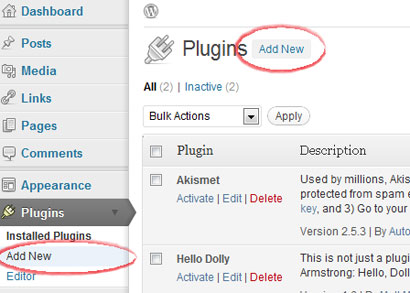
Accedi al tuo amministratore WordPress, apri Plugin, quindi scegli Aggiungi nuovo.
Plug-in CMS
I siti WordPress self-hosted possono utilizzare il plug-in Hitsteps dall'amministratore WordPress. I siti WordPress.com hanno un supporto JavaScript limitato, quindi utilizza il metodo widget solo quando il tuo piano lo consente.
 Consigliato WordPress self-hosted
 Guida all'installazione
Accedi al tuo amministratore WordPress, apri Plugin, quindi scegli Aggiungi nuovo.
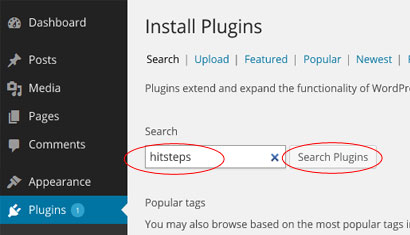
Cerca il plug-in del gestore visitatori Hitsteps dalla directory dei plug-in.
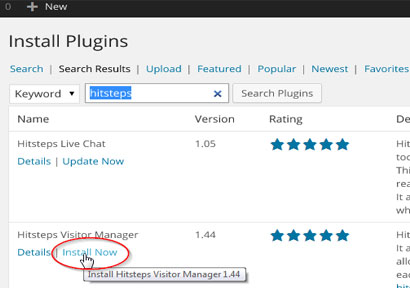
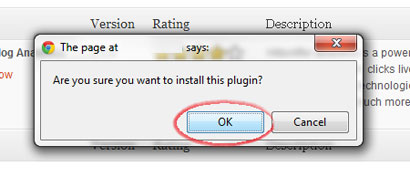
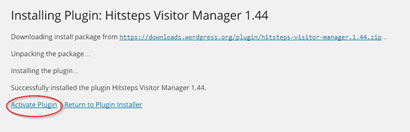
Fai clic su Installa ora, conferma l'installazione, quindi attiva il plug-in.
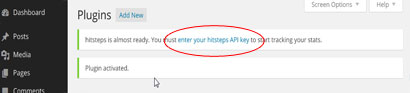
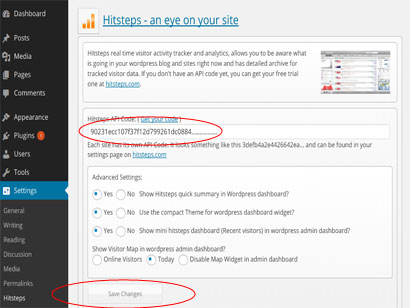
Apri le impostazioni del plugin Hitsteps, incolla la chiave API e salva.
Dopo l'avvio del monitoraggio, WordPress può mostrare un breve riepilogo e collegarti al dashboard live completo di Hitsteps.
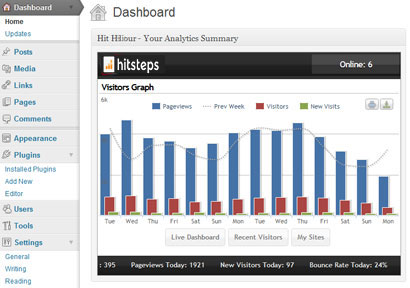
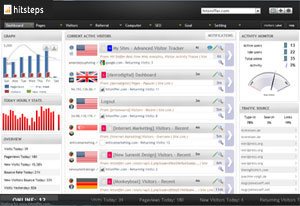
Dopo l'installazione
WordPress analytics workflows
Hitsteps brings the WordPress signals teams use for acquisition, conversion review, support, and reporting into one practical workflow.
Review clicks, impressions, CTR, average position, queries, and pages from your verified Google Search Console property.
Record WooCommerce order revenue and successful supported form submissions, then connect them to available visitor source and recent journey context.
Use goals, campaigns, funnel and conversion reports, exports, scheduled reports, and AI assistance to decide what to do next.
WordPress use cases
Start with the question your WordPress team needs to answer, then follow the visitor, source, conversion, or report context that supports the next decision.
Review UTM source and campaign attribution, order revenue, landing page, recent journey, and available visitor context around a purchase.
Measure successful supported form submissions and add available journey context so a sales or support team can understand what happened before the inquiry.
Compare Search Console queries and pages with live sources, top content, returning visitors, and page behavior.
Use multi-site access, PDF or CSV exports, scheduled reports, live paths, and AI-assisted summaries across client properties.