1
Add New Pluginを開く
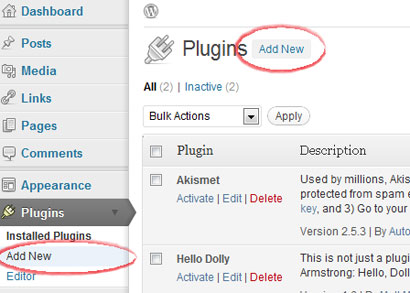
WordPress管理画面にログインし、Pluginsを開いてAdd Newを選択します。
CMSプラグイン
セルフホストのWordPressサイトでは、WordPress管理画面からHitstepsプラグインを使用できます。WordPress.comサイトはJavaScriptサポートが制限されるため、プランが許可する場合のみウィジェット方式を使用してください。
 セルフホストWordPressを推奨
 インストールガイド
WordPress管理画面にログインし、Pluginsを開いてAdd Newを選択します。
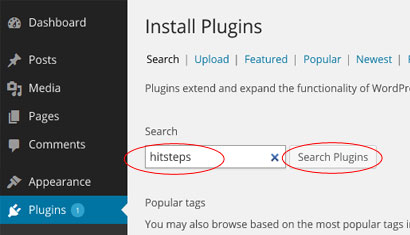
プラグインディレクトリでHitsteps visitor managerプラグインを検索します。
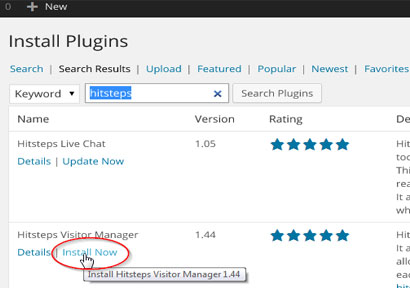
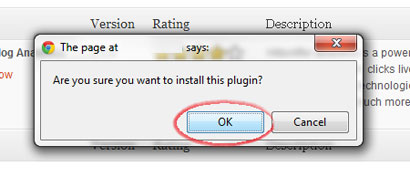
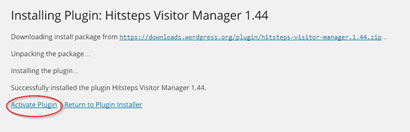
Install Nowをクリックし、インストールを確認してからプラグインを有効化します。
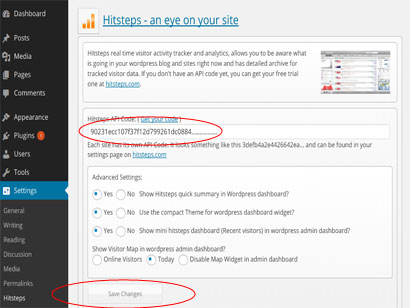
Hitstepsプラグイン設定を開き、APIキーを貼り付けて保存します。
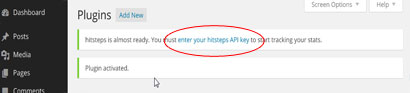
トラッキング開始後、WordPressは簡単な概要を表示し、Hitstepsの完全なライブダッシュボードへリンクできます。
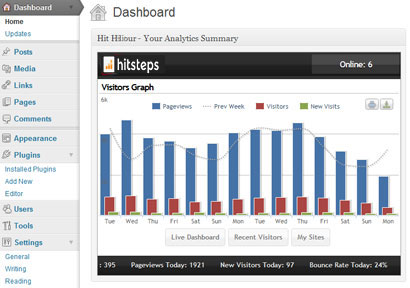
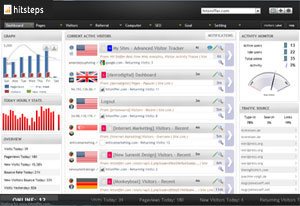
インストール後
WordPress analytics workflows
Hitsteps brings the WordPress signals teams use for acquisition, conversion review, support, and reporting into one practical workflow.
Review clicks, impressions, CTR, average position, queries, and pages from your verified Google Search Console property.
Record WooCommerce order revenue and successful supported form submissions, then connect them to available visitor source and recent journey context.
Use goals, campaigns, funnel and conversion reports, exports, scheduled reports, and AI assistance to decide what to do next.
WordPress use cases
Start with the question your WordPress team needs to answer, then follow the visitor, source, conversion, or report context that supports the next decision.
Review UTM source and campaign attribution, order revenue, landing page, recent journey, and available visitor context around a purchase.
Measure successful supported form submissions and add available journey context so a sales or support team can understand what happened before the inquiry.
Compare Search Console queries and pages with live sources, top content, returning visitors, and page behavior.
Use multi-site access, PDF or CSV exports, scheduled reports, live paths, and AI-assisted summaries across client properties.