1
Mở Thêm tiện ích mới
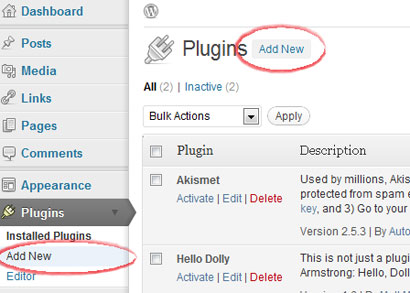
Đăng nhập vào trang quản trị WordPress, mở Tiện ích, rồi chọn Thêm mới.
Tiện ích CMS
Trang web WordPress tự lưu trữ có thể dùng tiện ích Hitsteps từ trang quản trị WordPress. Trang web WordPress.com hỗ trợ JavaScript hạn chế, nên chỉ dùng phương pháp tiện ích con khi gói của bạn cho phép.
 Khuyến nghị WordPress tự lưu trữ
 Hướng dẫn cài đặt
Đăng nhập vào trang quản trị WordPress, mở Tiện ích, rồi chọn Thêm mới.
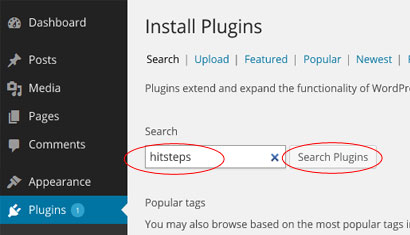
Tìm tiện ích quản lý khách truy cập Hitsteps trong thư mục tiện ích.
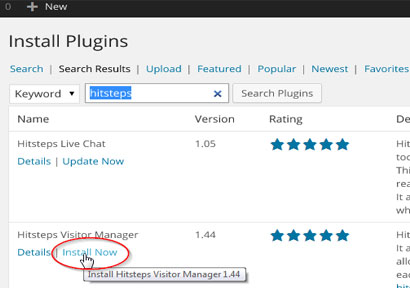
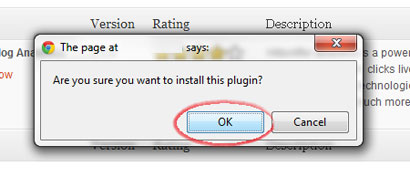
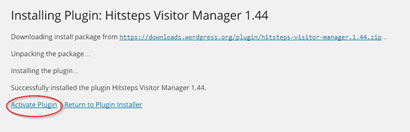
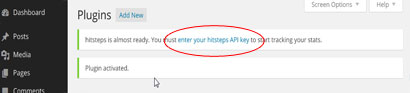
Bấm Cài đặt ngay, xác nhận cài đặt, rồi kích hoạt tiện ích.
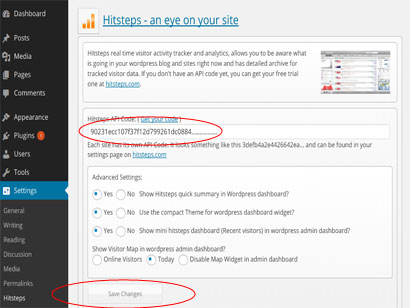
Mở cài đặt tiện ích Hitsteps, dán khóa API và lưu.
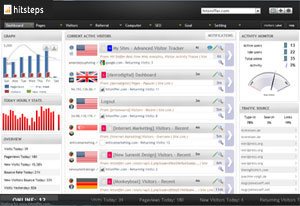
Sau khi theo dõi bắt đầu, WordPress có thể hiển thị tóm tắt nhanh và liên kết tới bảng điều khiển trực tiếp Hitsteps đầy đủ.
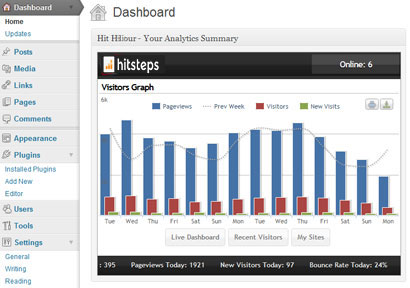
Sau khi cài đặt
WordPress analytics workflows
Hitsteps brings the WordPress signals teams use for acquisition, conversion review, support, and reporting into one practical workflow.
Review clicks, impressions, CTR, average position, queries, and pages from your verified Google Search Console property.
Record WooCommerce order revenue and successful supported form submissions, then connect them to available visitor source and recent journey context.
Use goals, campaigns, funnel and conversion reports, exports, scheduled reports, and AI assistance to decide what to do next.
WordPress use cases
Start with the question your WordPress team needs to answer, then follow the visitor, source, conversion, or report context that supports the next decision.
Review UTM source and campaign attribution, order revenue, landing page, recent journey, and available visitor context around a purchase.
Measure successful supported form submissions and add available journey context so a sales or support team can understand what happened before the inquiry.
Compare Search Console queries and pages with live sources, top content, returning visitors, and page behavior.
Use multi-site access, PDF or CSV exports, scheduled reports, live paths, and AI-assisted summaries across client properties.