1
打开“添加新插件”
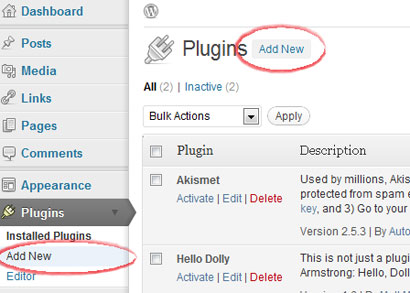
登录 WordPress 管理后台,打开“插件”,然后选择“添加新插件”。
CMS 插件
自托管 WordPress 网站可以从 WordPress 管理后台使用 Hitsteps 插件。WordPress.com 网站对 JavaScript 支持有限,因此只有在套餐允许时才使用小组件方式。
 推荐自托管 WordPress
 安装指南
登录 WordPress 管理后台,打开“插件”,然后选择“添加新插件”。
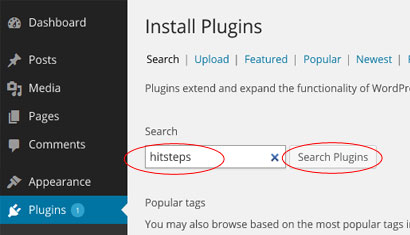
在插件目录中搜索 Hitsteps visitor manager 插件。
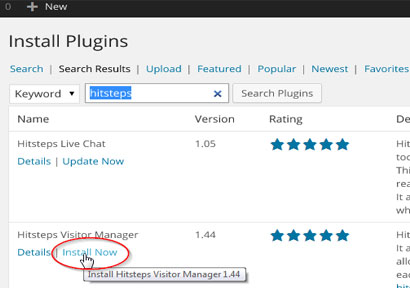
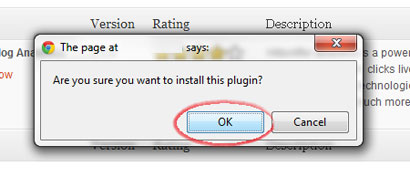
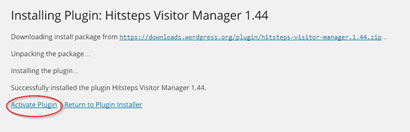
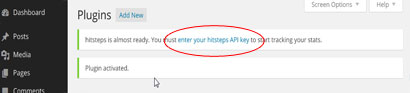
点击“立即安装”,确认安装,然后激活插件。
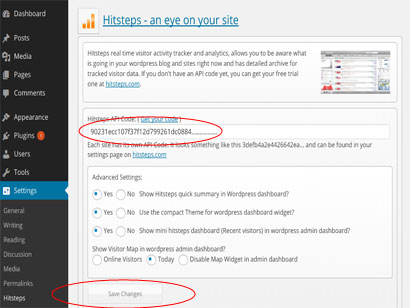
打开 Hitsteps 插件设置,粘贴 API 密钥,并保存。
追踪开始后,WordPress 可以显示快速摘要,并链接到完整的 Hitsteps 实时仪表盘。
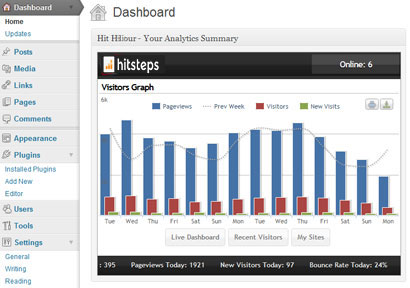
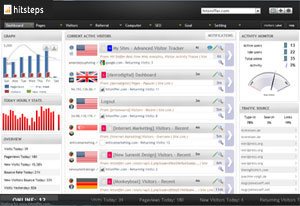
安装后
WordPress analytics workflows
Hitsteps brings the WordPress signals teams use for acquisition, conversion review, support, and reporting into one practical workflow.
Review clicks, impressions, CTR, average position, queries, and pages from your verified Google Search Console property.
Record WooCommerce order revenue and successful supported form submissions, then connect them to available visitor source and recent journey context.
Use goals, campaigns, funnel and conversion reports, exports, scheduled reports, and AI assistance to decide what to do next.
WordPress use cases
Start with the question your WordPress team needs to answer, then follow the visitor, source, conversion, or report context that supports the next decision.
Review UTM source and campaign attribution, order revenue, landing page, recent journey, and available visitor context around a purchase.
Measure successful supported form submissions and add available journey context so a sales or support team can understand what happened before the inquiry.
Compare Search Console queries and pages with live sources, top content, returning visitors, and page behavior.
Use multi-site access, PDF or CSV exports, scheduled reports, live paths, and AI-assisted summaries across client properties.