Maintained for real websites
Hitsteps has kept evolving across website platforms, browser changes, analytics shifts, and store workflows.
SlimStat is a strong choice if you want analytics stored in your WordPress database. Its Free plugin includes live visitor information, and Pro adds a live chart and heatmaps. Hitsteps connects WordPress to a hosted account, where you can follow a live page path and use visitor chat or click heatmaps when your plan includes them.
The choice starts with where you want the analytics workspace. SlimStat keeps its data with the WordPress site. Hitsteps puts the live visitor workflow in its hosted dashboard, with WordPress widgets available through the plugin. Both have useful real-time views; the relevant plan and your preferred data location decide which setup fits.
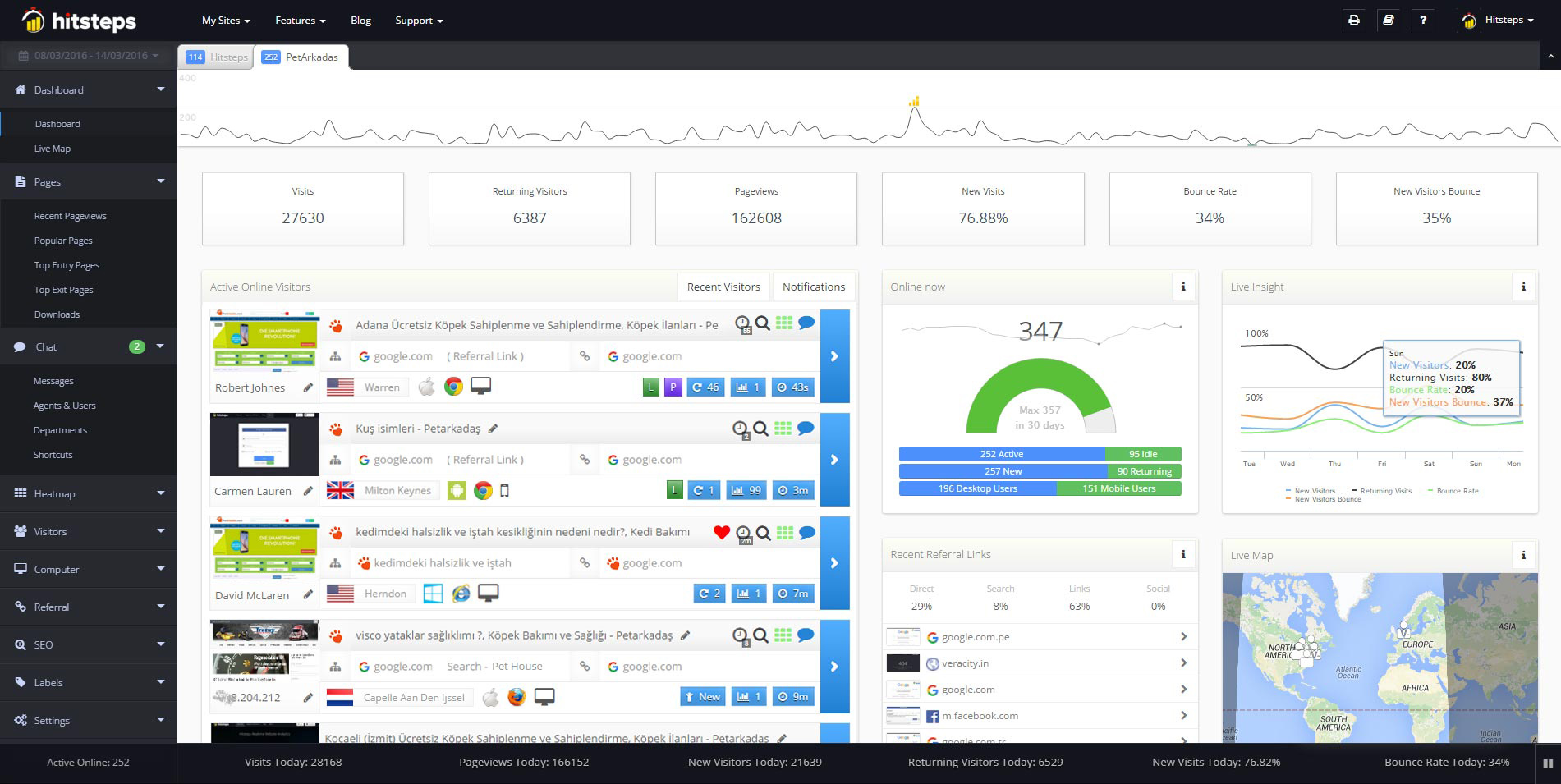
Use it when you need live visitor context, practical installation routes, and action tools around the traffic you already have.
Hitsteps has kept evolving across website platforms, browser changes, analytics shifts, and store workflows.
WordPress, Shopify, Wix, Google Tag Manager, HTML, CMS, commerce, browser, and desktop setup paths are documented from one hub.
Live dashboard, visitor profiles, heatmaps, chat, Segments, uptime, reports, and alerts stay connected after tracking is installed.



SlimStat says that pageviews, clicks, and visitor data land in your own WordPress database and stay there. Its pricing page lists 5 dashboard report views, geolocation, and 1 goal on Free, with no funnels. If keeping analytics in the site's WordPress database is your priority, that is a sound reason to choose SlimStat.
Hitsteps uses a hosted account. Connect the Hitsteps WordPress plugin with your website API key, and it adds tracking without editing your theme. The plugin also offers WordPress dashboard widgets, while the live visitor workspace is in Hitsteps. See how Hitsteps works with WordPress for the setup and live page paths.
SlimStat Free lists a Real-Time Access Log, so its live tracking does not require Pro. On the SlimStat pricing page, the separate Real-Time Report is a blurred preview on Free, while Pro offers a live chart updated minute by minute. SlimStat Pro also describes a User Overview with a per-visit timeline of registered users' pages and time on site.
Hitsteps Free includes a live visitor view and observed page paths for 1 site, up to 2,000 pageviews a month, with 14 days of history. Explore the live visitor view to see how a current visit moves from page to page. A page path shows observed activity; an anonymous visit does not identify a person by itself.
SlimStat lists a click heatmap overlay on any page in Pro; its Free tier says heatmaps are not available. Hitsteps click heatmaps start on Growth at $9.99/month. See Hitsteps click heatmaps for a view of which page elements draw clicks.
For example, you could follow a current Hitsteps visitor from a product page to shipping information and back, then use a click heatmap to see which elements people click over time. If a timely answer could help, visitor chat starts on Starter at $4.99/month. Visitor-facing chat is not listed on SlimStat's public pages (checked 19 Oct 2026) or its WordPress.org listing.
| Question | SlimStat | Hitsteps |
|---|---|---|
| Where is analytics data kept? | In the site's WordPress database, according to its WordPress.org listing. | In a hosted Hitsteps account connected to WordPress by an API key, with dashboard widgets in WordPress. |
| What can I see during a visit? | Free lists a real-time access log; Pro adds a live chart. | Free includes a live visitor view and observed page paths within Free limits. |
| Where are heatmaps listed? | A click heatmap overlay is listed in Pro. | Click heatmaps start on Growth. |
| What about goals and funnels? | Free lists 1 goal and no funnels; Pro lists 5 goals and 3 funnels. | Starter includes 3 goals; funnels start on Pro. |
| How can I use data beyond pageviews? | Pro lists data export and email reports. | Send custom events through JavaScript Actions. |
SlimStat's pricing page lists Free at $0 and says "Free forever." Pro licenses are USD billed annually at $39 for 1 site, $99 for 5 sites, and $199 for unlimited sites. It also lists 1 year of updates and support and a 14-day refund.
| SlimStat, USD billed yearly for Pro | Hitsteps, USD billed monthly |
|---|---|
| Free: $0. Pro for 1 site: $39/year. Pro for 5 sites: $99/year. Pro for unlimited sites: $199/year. SlimStat pricing. | Free: $0, up to 2,000 pageviews a month, 1 site, 14 days of history. Starter: $4.99/month. Growth: $9.99/month. Pro: $21.99/month. Business: $49.99/month. Scale: $99.99/month. Enterprise: $449.99/month. Hitsteps plans. |
Each column shows its own product and billing period. The prices do not pair equivalent plans. Hitsteps' USD billed monthly allowances are:
| Hitsteps plan | Price per month, USD | Pageviews per month | Sites | History | Selected plan features |
|---|---|---|---|---|---|
| Free | $0 | up to 2,000 | 1 | 14 days | Live visitor view |
| Starter | $4.99 | 10,000 | 2 | 30 days | 1 chat agent, 3 goals |
| Growth | $9.99 | 50,000 | 5 | 60 days | Click heatmaps, 3 chat agents |
| Pro | $21.99 | 500,000 | 30 | 180 days | Funnels, uptime monitoring, Hitsteps Commerce |
| Business | $49.99 | 1,000,000 | 100 | 360 days | Higher allowances |
| Scale | $99.99 | 12,000,000 | 400 | 360 days | Higher allowances |
| Enterprise | $449.99 | 60,000,000 | 1,000 | 360 days | Higher allowances |
Review current plans and trial terms. New Hitsteps accounts get a 7-day Pro trial with no card and no automatic charges. Pro features during the trial include funnels, uptime monitoring, and Hitsteps Commerce.
Choose SlimStat if you want analytics kept with WordPress and its Free access log, reports, and goal are enough, or if its Pro live chart, heatmaps, and reports suit your workflow. Its annual license options may also suit a team managing several WordPress sites.
Choose Hitsteps if your next step starts with a current visitor's observed page path and you may want to offer chat during the visit. You can begin with the live view on Free if eligible, add chat on Starter, or use click heatmaps on Growth. Pro adds funnels, uptime monitoring, and Commerce. Create a Hitsteps account to try Pro for 7 days without a card.
Yes. The SlimStat pricing page lists Free at $0 and says "Free forever." Pro licenses are priced in USD billed annually.
Yes. The SlimStat pricing page lists a Real-Time Access Log on Free; its separate Real-Time Report is a blurred preview on Free and a live chart in Pro. Hitsteps Free includes a live visitor view and observed page paths within its limits.
Yes. The SlimStat pricing page lists a click heatmap overlay in Pro and says heatmaps are not available on Free. Hitsteps click heatmaps start on Growth at $9.99/month, per the Hitsteps plans.
SlimStat says its analytics data stays in the site's WordPress database, according to its WordPress.org listing. The Hitsteps WordPress plugin connects to a hosted Hitsteps account with a website API key.
Yes. Connect the Hitsteps WordPress plugin to a hosted Hitsteps account with a website API key. New accounts get a 7-day Pro trial with no card. After the trial you can stay on Free, which includes the live visitor view, as long as your email is verified and your site fits Free's limits (up to 2,000 pageviews a month, 1 site), or choose a paid plan.