Maintained for real websites
Hitsteps has kept evolving across website platforms, browser changes, analytics shifts, and store workflows.
Hitsteps shows who is on your WordPress site right now and keeps your visit history on Hitsteps servers, not in your WordPress database. Statify lists a dashboard widget with a chart of site views, referrers and target pages, and stores its counts in a database table inside WordPress.
This page sets out what each tool lists, checked on 29 October 2026, and where Hitsteps goes further: a live visitor view on Free, chat from Starter and click heatmaps from Growth.
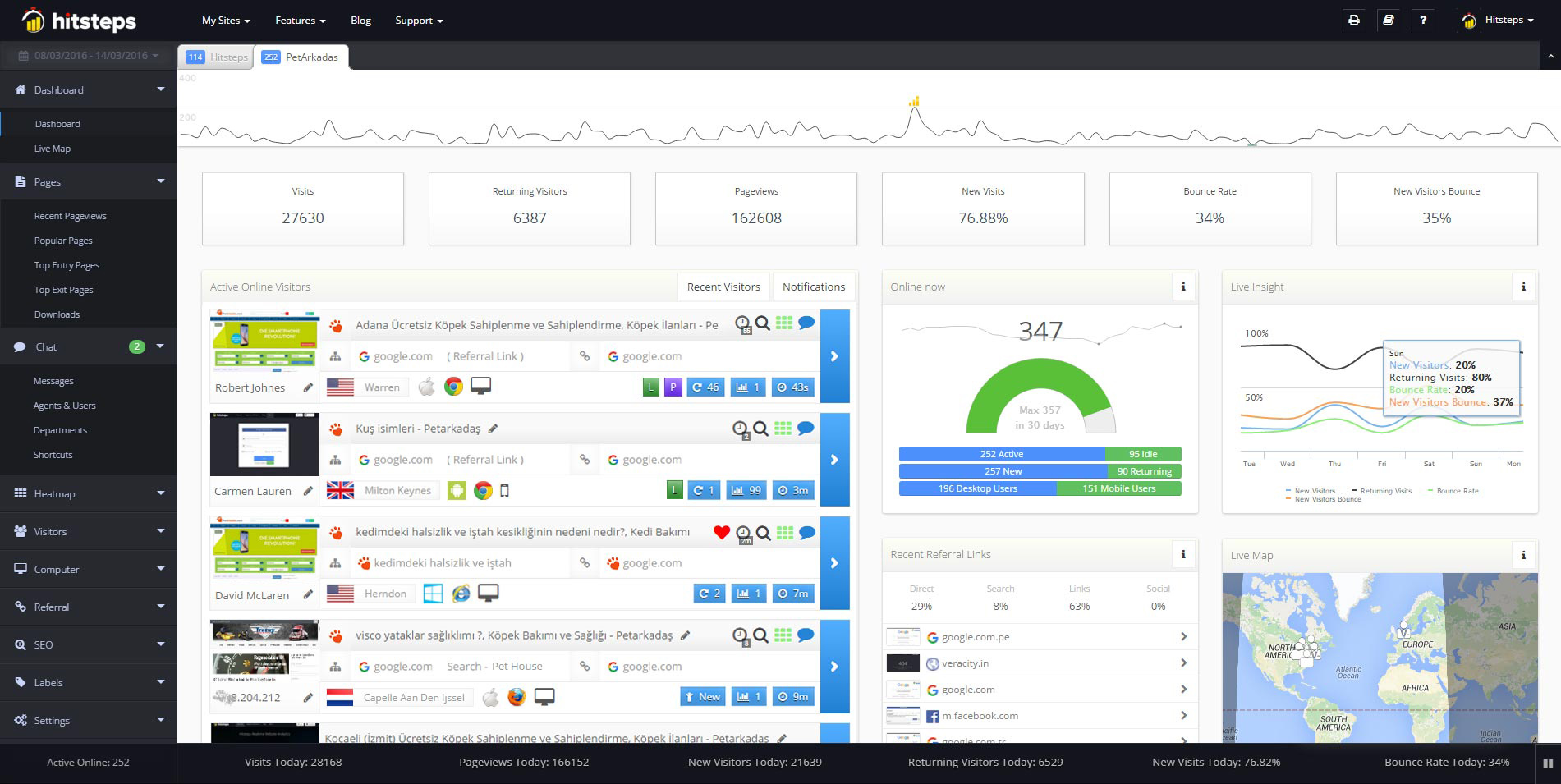
Use it when you need live visitor context, practical installation routes, and action tools around the traffic you already have.
Hitsteps has kept evolving across website platforms, browser changes, analytics shifts, and store workflows.
WordPress, Shopify, Wix, Google Tag Manager, HTML, CMS, commerce, browser, and desktop setup paths are documented from one hub.
Live dashboard, visitor profiles, heatmaps, chat, Segments, uptime, reports, and alerts stay connected after tracking is installed.



With Hitsteps, the WordPress plugin adds the tracking code and each visit is recorded on Hitsteps servers. Your visit history is not kept in your WordPress database.
Statify is a free plugin from pluginkollektiv. Its WordPress.org listing says it counts site views, not visitors, and shows an interactive chart followed by lists of the most common referrers and target pages in a dashboard widget (checked 29 October 2026).
The listing says Statify keeps its data in a table in your own WordPress database, for two weeks by default, with a longer period as an option, and a daily job deletes older rows. It also says the database volume can be expected to grow, especially when you lengthen that period.
The Hitsteps Free plan has a live visitor view for 1 site, up to 2,000 pageviews a month and 14 days of history. Paid plans start at $4.99 a month.
Hitsteps answers who is on your site right now. On Free you can open an active visit and follow its page path as it happens. See real-time visitor tracking.
The Statify listing describes view counts, referrers and target pages. It does not list a live visitor view, visit paths, funnels or heatmaps (checked 29 October 2026).
Hitsteps does not record or replay sessions. Its visitor path is a sequence of observed pages.
| Question | Statify | Hitsteps |
|---|---|---|
| Where are views stored? | In a table in your own WordPress database. | On Hitsteps servers. The WordPress plugin adds the tracking code, and your visit history is not kept in your WordPress database. |
| What does it count? | Site views, not visitors. | Pageviews and visitors, with the pages each visit viewed. |
| Can I watch visitors live? | Not listed (checked 29 October 2026). | Yes, on Free: open an active visit and follow its page path as it happens. |
| How long is history kept? | Two weeks by default, with a longer period as an option. A daily job deletes older rows. | Free keeps 14 days. Paid plans keep 30 days on Starter, up to 360 days on Business. |
| Chat, click heatmaps and funnels? | Not listed (checked 29 October 2026). | Chat from Starter at $4.99 a month, click heatmaps from Growth at $9.99 and funnels from Pro at $21.99. |
| What does it cost? | Free plugin. The listing shows no paid tier. | Free: up to 2,000 pageviews a month, 1 site and 14 days of history. Paid plans from $4.99 a month. New accounts get a 7-day Pro trial, no card needed. |
| Which sites does it work on? | WordPress sites. | WordPress, Shopify and any website where you can add a tracking code. |
Statify facts checked on 29 October 2026 against its WordPress.org listing. Statify is a trademark of its owner. Statify and pluginkollektiv are not affiliated with and do not endorse Hitsteps.
When someone needs help during a visit, website live chat can put a conversation beside the page and visitor context. Starter is $4.99 a month and includes 1 chat agent and 3 goals. Growth is $9.99 a month and includes 3 chat agents and click heatmaps, which show which page elements receive clicks. Pro is $21.99 a month and includes uptime monitoring and funnels. The plan allowances are in the table below.
The Statify listing does not mention visitor chat, click heatmaps, uptime checks or funnels (checked 29 October 2026). That describes the checked listing only.
The Statify listing presents a free plugin and shows no paid tier (checked 29 October 2026). Hitsteps lists paid plans in USD billed monthly, starting at $4.99 a month for Starter.
| Statify, WordPress plugin | Hitsteps, USD billed monthly |
|---|---|
| Free. No paid tier on the listing. | Free: $0 for up to 2,000 pageviews a month, 1 site and 14 days of history. Starter $4.99, Growth $9.99, Pro $21.99, Business $49.99 and Scale $99.99 a month, with higher tiers up to Enterprise at $449.99. |
The columns show each product on its own terms. Rows do not pair equivalent plans: Statify is one free plugin, while Hitsteps is a hosted service with a Free plan and paid tiers.
The Hitsteps USD billed monthly plan limits are:
| Hitsteps plan | Price per month, USD | Pageviews per month | Sites | History | Selected plan features |
|---|---|---|---|---|---|
| Free | $0 | up to 2,000 | 1 | 14 days | Live visitor view |
| Starter | $4.99 | 10,000 | 2 | 30 days | 1 chat agent, 3 goals |
| Growth | $9.99 | 50,000 | 5 | 60 days | Click heatmaps, 3 chat agents |
| Pro | $21.99 | 500,000 | 30 | 180 days | Uptime monitoring, funnels |
| Business | $49.99 | 1,000,000 | 100 | 360 days | Higher allowances |
| Scale | $99.99 | 12,000,000 | 400 | 360 days | Higher allowances |
There are higher tiers beyond Scale, up to Enterprise at $449.99 a month.
Review current plans and trial terms. New Hitsteps accounts get a 7-day Pro trial with no card needed.
Use Hitsteps when you want to see visitors as they arrive, follow a visit page by page, or add chat and click heatmaps as your site grows. Your visit history stays on Hitsteps servers rather than in your WordPress database. The trade offs: you need an account, your visit data is stored by Hitsteps, and Free has a pageview limit. Like any analytics script, it can be blocked by ad blockers, so check it by watching your own visit arrive in the live view.
A dashboard widget with a chart of site views, referrers and target pages. It counts views rather than visitors, keeps its data in your WordPress database for a limited period, and does not mention live visitors, chat, heatmaps or funnels (WordPress.org listing, checked 29 October 2026).
1. Create a Hitsteps account and add your website. 2. Install the WordPress plugin and connect it with your site API key, or paste the tracking code into your site. 3. Open your site in a private window and watch your own visit arrive in the live visitor view.
You can keep Statify active while you test, because the two tools count independently. The numbers will not match exactly: Statify counts site views, and Hitsteps follows visitors and their page paths.
New accounts get a 7-day Pro trial, no card needed. After the trial, stay on Free with a verified email and a site within the Free limits, or choose a paid plan. Chat starts on Starter; click heatmaps start on Growth.
Comparing other WordPress plugins? Read the Independent Analytics, Koko Analytics and WP Statistics comparisons, or browse all analytics comparisons.
In a table in your own WordPress database, according to its WordPress.org listing (checked 29 October 2026). The listing says it keeps data for two weeks by default, offers a longer period as an option, and expects the database volume to grow with it. Hitsteps records visits on its own servers instead, so your visit history is not kept in your WordPress database.
Its listing describes a chart of site views with referrers and target pages, and says Statify counts views, not visitors. It does not list a live visitor view (checked 29 October 2026). Hitsteps Free includes a live visitor view for 1 site, up to 2,000 pageviews a month and 14 days of history.
Yes. Hitsteps Free includes a live visitor view for 1 site, up to 2,000 pageviews a month and 14 days of history. Chat starts on Starter at $4.99 a month and click heatmaps on Growth at $9.99 a month. New accounts get a 7-day Pro trial, no card needed.
Yes. They count independently, so you can keep Statify active while you compare. The numbers will not match exactly, because Statify counts site views and Hitsteps follows visitors and their page paths.
No. The WordPress plugin adds the tracking code, and each visit is recorded on Hitsteps servers, so your visit history is not kept in your WordPress database.