Return-visit history
Review the available sequence of visits associated with the same browser profile and see how engagement changes over time.
Hitsteps organizes the pages, sources, devices, return visits, and tracked actions associated with a visitor profile. When your website legitimately provides a customer identifier, the profile can also support known-customer context without pretending that anonymous traffic reveals a person automatically.
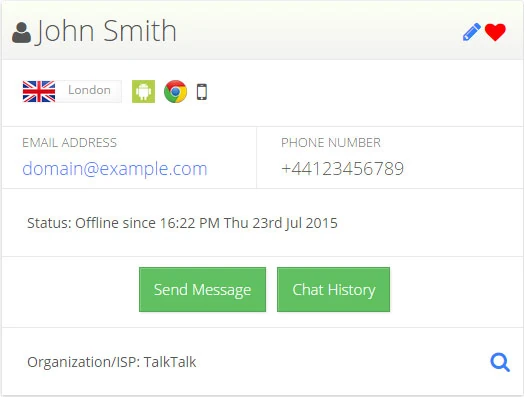
A list of disconnected pageviews makes it difficult to understand repeat interest or the path behind a customer question. Visitor profiles keep the supported history together so teams can move from one visit to the larger relationship when a legitimate link exists.
Review the available sequence of visits associated with the same browser profile and see how engagement changes over time.
Attach an internal customer identity when your website legitimately supplies it after a form, login, purchase, or supported integration.
Keep sources, landing pages, page paths, devices, approximate locations, Segments, and tracked actions close to the profile.
Use it when you need live visitor context, practical installation routes, and action tools around the traffic you already have.
Hitsteps has kept evolving across website platforms, browser changes, analytics shifts, and store workflows.
WordPress, Shopify, Wix, Google Tag Manager, HTML, CMS, commerce, browser, and desktop setup paths are documented from one hub.
Live dashboard, visitor profiles, heatmaps, chat, Segments, uptime, reports, and alerts stay connected after tracking is installed.



Anonymous profiles can describe a browser journey without naming the person using it. Shared devices, cleared storage, privacy controls, and missing identifiers can split or combine activity in ways that require careful interpretation.
Configure Hitsteps and the website consent experience so the permitted page and visit activity can be recorded appropriately.
Allow the analytics profile to organize return activity when the available browser and tracking signals support that association.
When appropriate, pass an allowed internal identifier after the visitor logs in, submits an identified form, or completes a purchase.
Review the history to answer a concrete analytics, support, retention, or customer-experience question rather than collecting context without a use.
When a customer identifies themselves, review the available journey behind the question so they do not need to repeat every step.
Understand which content or products a returning browser profile revisits before a conversion or direct interaction.
Connect permitted pre- and post-purchase activity to an internal customer profile when the website supplies the necessary identifier.
Clear answers about what this feature reports, how to use it, and where its limits are.
No. An anonymous profile contains the visit signals available to Hitsteps. A name or customer identity can only be associated when your website legitimately obtains and supplies that information through a direct interaction.
Depending on tracking, consent, and configuration, it can organize visit history, page paths, sources, devices, browser information, approximate location, Segments, goals, and other supported actions associated with the profile.
Different devices, browsers, cleared storage, consent choices, and absent identity signals can create separate anonymous profiles. A permitted stable identifier can support a cross-device association after the website knows the customer.
Connect this report with the surrounding visitor, acquisition, and workflow context.
Create a free account, install the Hitsteps tracking code, and confirm your first visit before choosing the plan that fits your traffic and reporting needs.