Browser distribution
Compare the reported browser families represented in tracked visits and see how the mix changes over the selected period.
Browser analytics helps product and web teams prioritize compatibility work using their own traffic. Hitsteps shows reported browser context in aggregate reports and visitor details, with the understanding that privacy controls, in-app browsers, and modified user agents can limit precision.
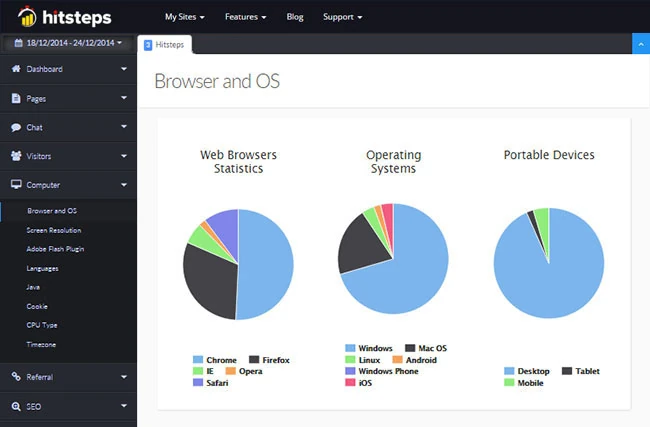
A generic browser market-share chart does not describe the people using your site. Your first-party report can show whether an important audience depends on a browser, embedded webview, or device combination that deserves focused testing.
Compare the reported browser families represented in tracked visits and see how the mix changes over the selected period.
Open a visit to review browser context beside its device, source, approximate location, page path, and tracked actions.
Use browser segments to investigate whether exits or failed journeys cluster around a particular reported environment.
Use it when you need live visitor context, practical installation routes, and action tools around the traffic you already have.
Hitsteps has kept evolving across website platforms, browser changes, analytics shifts, and store workflows.
WordPress, Shopify, Wix, Google Tag Manager, HTML, CMS, commerce, browser, and desktop setup paths are documented from one hub.
Live dashboard, visitor profiles, heatmaps, chat, Segments, uptime, reports, and alerts stay connected after tracking is installed.



Browsers increasingly reduce identifying detail, and embedded or privacy-focused environments may report generic or altered information. Browser analytics helps target testing, but a report alone does not prove the cause of a website problem.
Run Hitsteps across normal website activity long enough to capture the browser mix relevant to the decision you are making.
Identify the browser families and device combinations that account for meaningful visits, customers, or key page journeys.
Compare page paths and tracked outcomes where a browser segment appears to exit earlier or behave differently.
Use the analytics signal to choose a test environment, then confirm the actual rendering or functional issue in that browser.
Choose the browsers and device combinations that should receive routine regression coverage based on real audience use.
Investigate whether incomplete checkout journeys are concentrated in a reported browser before reproducing the flow.
Notice traffic arriving through embedded browser environments and test important landing pages within those apps when identifiable.
Clear answers about what this feature reports, how to use it, and where its limits are.
It reports the browser information available to Hitsteps. Privacy protections, in-app webviews, extensions, automation, and modified user agents can reduce or change that information, so some classifications will be less specific than others.
It shows which reported environments matter to your audience and where behavior may differ. That evidence helps choose test priorities, but the team should still reproduce a suspected issue directly before changing the site.
Visits through embedded browsers can be tracked when the page and tracking code load normally. The amount of browser detail available depends on what that environment reports, so an in-app browser may sometimes appear under a broader label.
Connect this report with the surrounding visitor, acquisition, and workflow context.
Create a free account, install the Hitsteps tracking code, and confirm your first visit before choosing the plan that fits your traffic and reporting needs.