Country distribution
See how tracked visits are distributed across approximate countries for the selected reporting period.
Country tracking groups visits by the approximate location signals available from their network connection. Use it to compare markets and add context to individual journeys while allowing for VPNs, proxies, mobile routing, and other sources of location error.
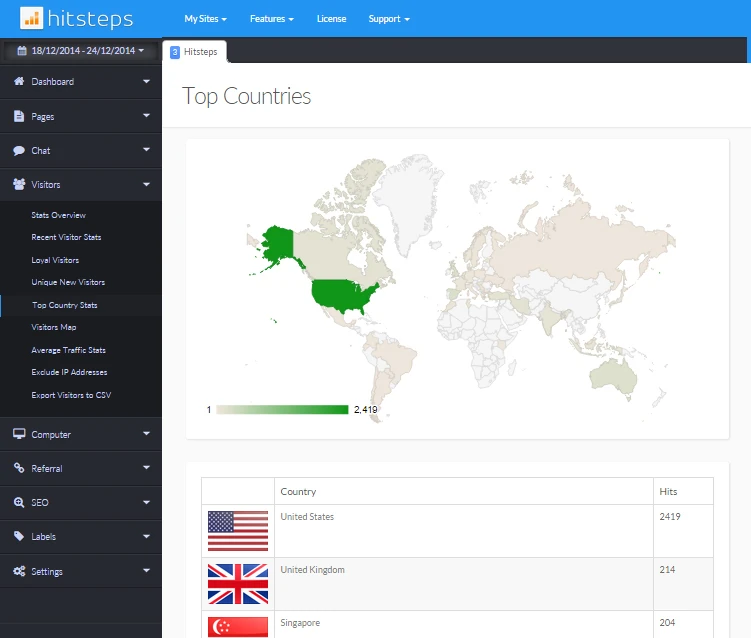
A country total becomes more useful when teams can compare it with landing pages, campaigns, devices, goals, and visitor journeys. That combination helps distinguish meaningful market interest from traffic that does not match the website offer.
See how tracked visits are distributed across approximate countries for the selected reporting period.
Open individual visits to review the available country signal beside referrer, landing page, device, browser, and page path.
Compare country traffic with content interest and configured outcomes instead of judging a market from visit volume alone.
Use it when you need live visitor context, practical installation routes, and action tools around the traffic you already have.
Hitsteps has kept evolving across website platforms, browser changes, analytics shifts, and store workflows.
WordPress, Shopify, Wix, Google Tag Manager, HTML, CMS, commerce, browser, and desktop setup paths are documented from one hub.
Live dashboard, visitor profiles, heatmaps, chat, Segments, uptime, reports, and alerts stay connected after tracking is installed.



A network can terminate in a different place from the person using it. VPNs, proxies, corporate gateways, satellite providers, mobile carriers, and database coverage can all affect the reported country.
Select enough normal traffic to reduce the chance that a short campaign spike or unusual referral dominates the result.
Identify the countries contributing meaningful tracked visits and note changes from the previous comparable period.
Compare landing pages, journey depth, goals, and other configured actions before deciding that a country represents a valuable market.
Use customer, sales, shipping, language, or campaign data to confirm the market signal rather than relying on approximate network location alone.
Identify countries showing sustained relevant interest before investing in translated content or a localized user experience.
Check whether attributable campaign visits arrive from the intended countries and engage with the expected landing pages.
Notice an unexpected geographic pattern and investigate its sources and behavior without assuming the traffic is harmful from location alone.
Clear answers about what this feature reports, how to use it, and where its limits are.
No. Website analytics normally derives an approximate location from available network information. It does not provide a precise device GPS position through this feature.
VPNs, proxies, corporate networks, mobile carrier routing, privacy services, and imperfect location databases can make a connection appear in a different country from the person using it.
Country totals are a starting point. Compare them with relevant landing pages, repeat visits, configured goals, campaigns, purchases, or other business outcomes before assessing value.
Connect this report with the surrounding visitor, acquisition, and workflow context.
Create a free account, install the Hitsteps tracking code, and confirm your first visit before choosing the plan that fits your traffic and reporting needs.