Approximate live locations
Plot current visits using the city or country context available from network-location data, subject to its accuracy limits.
The Hitsteps live map plots active visits using approximate network-location signals and refreshes as website activity changes. It provides a fast geographic overview while keeping the associated visitor journey available for closer inspection.
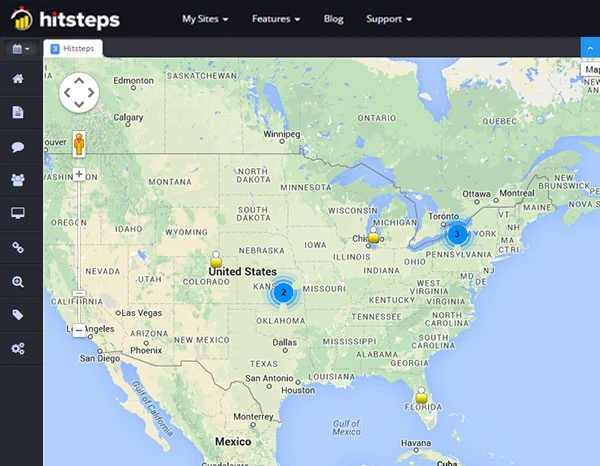
A map makes a sudden regional pattern easy to notice, but the useful answer still comes from the visit. Hitsteps lets teams move from the geographic overview to available sources, landing pages, devices, and page journeys.
Plot current visits using the city or country context available from network-location data, subject to its accuracy limits.
Watch the geographic picture change as tracked visitors arrive, browse, and leave the active session view.
Use a mapped visit as the starting point for reviewing its available source, current page, device, and broader journey.
Use it when you need live visitor context, practical installation routes, and action tools around the traffic you already have.
Hitsteps has kept evolving across website platforms, browser changes, analytics shifts, and store workflows.
WordPress, Shopify, Wix, Google Tag Manager, HTML, CMS, commerce, browser, and desktop setup paths are documented from one hub.
Live dashboard, visitor profiles, heatmaps, chat, Segments, uptime, reports, and alerts stay connected after tracking is installed.



The live map relies on network-derived location. A VPN, proxy, mobile carrier, corporate gateway, or location-database limitation can place a marker away from the person using the device.
Use it during a campaign launch, event, content release, incident, or normal monitoring period when geography matters.
Look for an unexpected region, campaign market, or concentration of active visits without drawing conclusions from one marker.
Review the available source, landing page, current page, device, browser, and activity behind the geographic signal.
Use country, source, campaign, and page reports over a representative period to see whether the live observation persists.
Watch whether initial attributable visits appear in intended markets, then inspect the journeys behind those map points.
Get a quick view of active geographic reach before using longer-period country reports for a market decision.
Notice a sudden geographic shift and review its sources and behavior before deciding whether it is expected, irrelevant, or suspicious.
Clear answers about what this feature reports, how to use it, and where its limits are.
No. It uses approximate network-location data, commonly at a country or city level when available. It does not provide precise GPS coordinates for a visitor device.
VPNs, proxies, corporate networks, mobile routing, privacy services, and location-database coverage can make a connection appear somewhere other than the visitor location.
The live map is a current visual overview of active visits. Country reports aggregate traffic over a selected period and are better suited to comparing sustained geographic patterns.
Connect this report with the surrounding visitor, acquisition, and workflow context.
Create a free account, install the Hitsteps tracking code, and confirm your first visit before choosing the plan that fits your traffic and reporting needs.