Flexible visitor journeys

Measure the journey, not just the pageview

Funnels connect the visitor signals that matter to your business into one readable path. Start with everyone, narrow each stage with a Trigger, and see where visitors continue, drop away, or reach the outcome you care about.

  • Use flexible Trigger filters—not only page URLs—to describe real visitor intent.
  • Compare entries, stage progression, drop-offs, and completed journeys in one view.
  • Click a stage to open the visitors represented by that label or trigger.
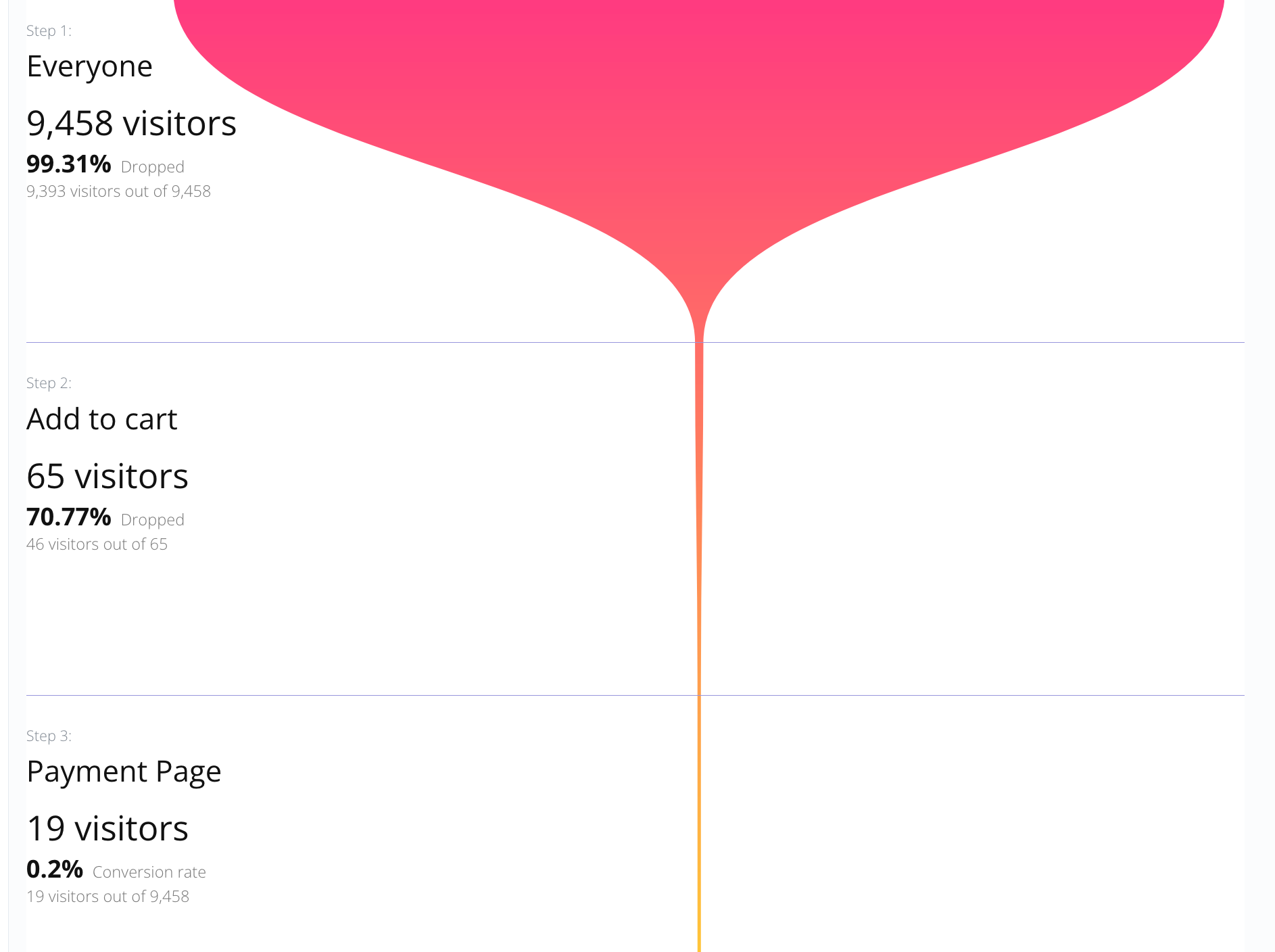
Funnel showing Everyone, Add to cart, and Payment Page stages with visitor counts and drop-off rates
What a Funnel means

A Funnel is a sequence of evidence about one visitor journey

A Funnel does not replace Triggers. It composes them. Each stage is a question about a visitor: did this person arrive from the campaign I care about, show the behavior I expect, carry a label, or reach the next business milestone? Put those questions in order and the result becomes a journey your whole team can understand.

The important distinction is flexibility: a Funnel stage can represent any useful Trigger condition available in your account. It is not a page-URL report with a funnel-shaped drawing.

Filter the behavior that matters

Use page activity when it answers the question, but also combine the other visitor filters and labels your Triggers can identify: acquisition context, device, location, browser, campaign, custom data, or a meaningful product action.

Choose the journey rules

Require exact order when every step is mandatory. Use forward order when visitors may skip an optional stage while still moving from the beginning toward the final outcome.

Move from totals to people

A stage count is only the beginning. Click a stage to open the visitors behind that label or trigger, then inspect the individual path and context that explains the number.

How the visual works

Read every stage as an answer to the same journey question

The example above starts with Everyone, narrows to Add to cart, and ends at Payment Page. The width of the path makes the loss visible; the text beside each stage gives the count and the rate needed to decide what to improve.

Start with a broad entry

Use Everyone when the journey begins with all visitors, or choose an entry Trigger when only a specific source, audience, or behavior should enter the measurement.

Add meaningful milestones

Chain the existing labels and Triggers in the order that represents progress: an intent signal, an important action, a qualification step, or any other milestone your site can record.

Inspect drop-offs and completion

Compare each stage with the one before it and with the original entries. A large drop-off identifies where to investigate; a completed journey shows the outcome reached by the chain.

Open the exact visitors behind a stage

Click a stage when the aggregate view raises a question. The dashboard opens that specific visitor label so you can connect the funnel result to real sessions and context.

Bằng chứng sản phẩm

Hitsteps là sản phẩm phân tích được duy trì nghiêm túc, không phải một đoạn mã tạm bợ.

Dùng công cụ này khi bạn cần ngữ cảnh khách truy cập trực tiếp, các cách cài đặt thực tế và công cụ hành động xung quanh lưu lượng bạn đang có.

Từ năm 2013

Được duy trì cho các trang web thật

Hitsteps liên tục phát triển cùng nền tảng trang web, thay đổi trình duyệt, thay đổi phân tích và quy trình cửa hàng.

Hơn 15 cách cài đặt

Hoạt động ngay nơi trang web của bạn đang chạy

Các cách cài đặt WordPress, Shopify, Wix, Google Tag Manager, HTML, CMS, thương mại, trình duyệt và ứng dụng máy tính đều được hướng dẫn từ một trung tâm.

Một không gian làm việc

Từ lượt theo dõi đến hành động tiếp theo

Bảng điều khiển trực tiếp, hồ sơ khách truy cập, bản đồ nhiệt, trò chuyện, điều kiện kích hoạt, giám sát thời gian hoạt động, báo cáo và cảnh báo vẫn kết nối với nhau sau khi cài theo dõi.


Bảng điều khiển trực tiếp Hitsteps với hoạt động khách truy cập và biểu đồ
Bảng điều khiển trực tiếp
Báo cáo bản đồ nhiệt và phân tích trang của Hitsteps
Ngữ cảnh bản đồ nhiệt
Giao diện trò chuyện trực tiếp Hitsteps được kết nối với ngữ cảnh khách truy cập
Quy trình trò chuyện
Reliable measurement over time

A useful preview now, a durable history after you save

The Funnel builder shows a recent sample so you can validate the chain before saving it. Once saved, the history fill runs in the background and the dashboard reports its progress. New Triggers begin recording only after they are created, while the saved Funnel can backfill eligible recent history without freezing the site for other users.

Funnel history is designed to stay lightweight: recent preview data is bounded, backfill is queued, and ongoing calculation can be processed incrementally as new visitor data arrives.
Examples beyond page paths

Build the Funnel that matches your business question

Ecommerce purchase journey

Everyone → Add to cart → Payment Page → Thank you. Add a source or campaign condition when you want to compare the journey for a particular acquisition channel.

Campaign quality

Visitors from a campaign → product engagement → qualified label → conversion. The path can focus on visitor attributes and labels even when the pages are shared with other audiences.

Lead qualification

A visitor arrives from a referral, returns on another device, reaches a key action, and becomes a qualified lead. Use the conditions your tracking setup can distinguish at each step.

Actionable completion alerts

Enable desktop or email notifications when a Funnel reaches its final step, so a completed journey can become a follow-up task instead of another number waiting in a report.

Câu hỏi và câu trả lời

Funnel details, clearly explained

Is a Funnel limited to page URLs?

No. A Funnel is made from your existing Triggers, so each step can use whatever visitor condition that Trigger supports. Page views are one useful example, but source, campaign, device, location, browser, custom labels, and other visitor signals can also be part of a journey.

What is the difference between exact order and forward order?

Exact order requires a visitor to reach every stage in sequence. Forward order keeps the sequence but allows a visitor to skip a stage, which is useful when a step is optional or not recorded for every visitor.

Can I see which visitors reached a Funnel stage?

Yes. Funnel stages are actionable. Select a stage to open the visitor list for that specific label or trigger result, so the aggregate number can lead directly to an investigation.

When does a new Trigger start contributing to a Funnel?

A Trigger starts recording after it is created. A newly saved Funnel can show the available recent sample immediately, while its saved history is filled in the background without blocking the dashboard.

Turn insight into a workflow

Build a Funnel around the outcome your team cares about

Create the Triggers first, chain them into a Funnel, validate the recent sample, and let the background history process fill in the saved view.

Bắt đầu miễn phí